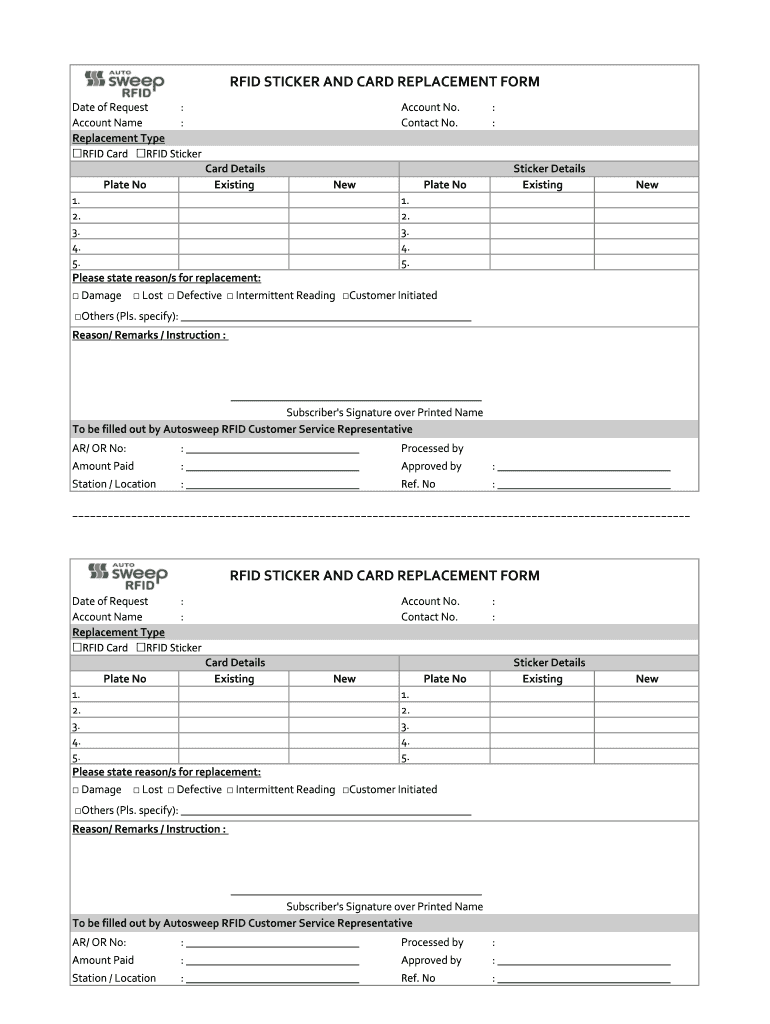
RFID STICKER AND CARD REPLACEMENT FORM Date of Request : Account Name : Replacement Type RFID Card RFID StickerAccount No. Contact No.Card Details ExistingPlate NoNew: :Sticker Details ExistingPlate.

Open form follow the instructions

Easily sign the form with your finger

Send filled & signed form or save
How to fill out the Rfid Replacement Form online
Filling out the Rfid Replacement Form online can streamline the process of replacing lost or defective RFID cards and stickers. This guide provides clear instructions to help users complete the form accurately and efficiently.
Follow the steps to successfully complete the Rfid Replacement Form online.
- Press the ‘Get Form’ button to access the Rfid Replacement Form and open it in your online document editor.
- Begin by entering the 'Date of Request' at the top of the form. This should be the current date you are submitting the request.
- In the 'Account Name' field, input the name associated with the RFID account you are requesting a replacement for.
- Select the type of replacement you are requesting by marking the appropriate checkbox for either 'RFID Card' or 'RFID Sticker.'
- Fill in your 'Account No.' along with your 'Contact No.' to allow for easy communication regarding your request.
- For card replacement specifics, indicate the 'Existing Plate No.' and the 'New Plate No.' fields as applicable.
- If applicable, provide details in the 'Card Details' section, including the existing and new information in the respective fields.
- Move to the 'Sticker Details' section and fill in the 'Existing Plate No.' and 'New Plate No.' similarly.
- In the section titled 'Please state reason/s for replacement,' check all boxes that apply: Damage, Lost, Defective, Intermittent Reading, Customer Initiated, or Others, and specify if necessary.
- Use the 'Reason/Remarks/Instruction' area to provide any additional context or instructions regarding the replacement request.
- Complete the form by signing as the subscriber and printing your name for verification.
- After filling out the form, review all the information for accuracy. You can then save changes, download, print, or share the completed form based on your needs.
Complete your Rfid Replacement Form online today for a seamless replacement experience.
Experience a faster way to fill out and sign forms on the web. Access the most extensive library of templates available.
Related content
Do not use an incorrect applicator because it could damage your tags. Please complete this...
tags for the animals listed above were retagged with the replacement R.F.I.D. tags shown...
Feb 11, 2021 — RFID tags won't entirely replace bar codes in the near future -- far...
Get answers to your most pressing questions about US Legal Forms API.
What happen if you lost RFID card?
For lost old cards, a new Easytrip card, RFID sticker and account number will be issued. The P100 fee for lost card and P200-P500 initial load will apply.
How do I contact RFID customer service?
You are also welcome to give us a call at (303) 366-1234 or email our departments or employee personnel directly at the address listed below: info@rfidinc.com. Customer Service.
How do I get a replacement RFID card?
For Easytrip RFID replacement, just go to any Easytrip Installation sites and have your Easytrip RFID sticker checked. If defect has been found on the sticker, you may have it replaced by the installer. RFID check-up is FREE, replacement of RFID Sticker is FREE when defects were found, just pay the initial load.
Can I get another RFID?
Motorists with damaged or lost RFID stickers can file for a replacement at any LTO branch, upon presenting an Affidavit of Loss/Dilapidation and payment of a replacement fee.
How do you contact a RFID auto sweep?
You may also report the incident to the Autosweep hotline at (02) 5-318-8655(TOLL) or email customercare@autosweeprfid.com.
What to do if RFID is broken?
In case your Easytrip or Autosweep RFID sticker is damaged, defective, unreadable, or you're experiencing intermittent reading, you may request for an RFID sticker tag replacement. All you have to do is go to an Autosweep or Easytrip RFID station and have your RFID sticker tag checked.
How to track RFID?
Can RFID tags be tracked? Yes, RFID tags can be tracked. They can be tracked automatically using active RFID tags or manually using passive RFID tags. To be tracked RFID tags provide data related to where they have been and where they currently are.
Where can I have my RFID loaded?
More Ways to Reload RFID Express, Online, and E-wallet: GCash, PayMaya, Coins.ph, Eon, JustPay.To, ExpressPay, E.CPay, E.Tap, TouchPay. Online Banking Partners: Bank of Commerce, Union Bank, Chinabank, Maybank. Gasoline Station Partners: Petron & Shell. Mall Partners: SM, Robinsons, Rustan's, Walter Mart.
Use professional pre-built templates to fill in and sign documents online faster. Get access to thousands of forms.
If you believe that this page should be taken down, please follow our DMCA take down process here.