Loading
Get Childrens Records Checklist
How it works
-

Open form follow the instructions
-

Easily sign the form with your finger
-

Send filled & signed form or save
How to fill out the Childrens Records Checklist online
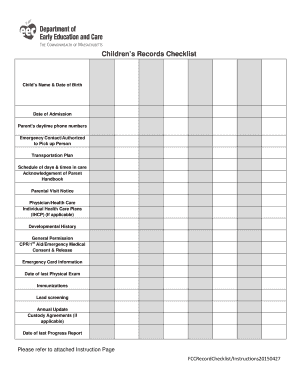
Filling out the Childrens Records Checklist is an essential step in maintaining accurate records for children's care. This guide will provide clear and comprehensive instructions to help you complete the checklist accurately and efficiently.
Follow the steps to complete the Childrens Records Checklist online.
- Click the ‘Get Form’ button to obtain the form and open it in the editor.
- Enter the child’s name and date of birth in the respective fields. This is crucial for identifying each child accurately.
- Indicate the child’s date of admission into the program. This date is significant for progress reports and medical information.
- List the parents' first names and their daytime phone numbers for easy contact.
- Indicate with a √ who the emergency contacts are and who is authorized to pick up the child.
- Provide the transportation plan, indicating how the child will arrive and depart from the program.
- Confirm the schedule of days and times the child is in care by marking the appropriate fields.
- Acknowledge the receipt of the Parent Handbook by marking the appropriate box.
- Confirm the parental visit notice by indicating that parents understand their right to visit the program at any time.
- Record the contact information for the child's physician and any health concerns.
- If applicable, enter the date that the Individual Health Care Plan was issued.
- Mark whether the developmental history is on file.
- Confirm that the General Permission form has been signed by parents.
- Indicate the date the CPR/First Aid/Emergency Medical Consent form was signed.
- Confirm that Emergency Card information is kept in the first aid kit.
- Enter the date of the last physical examination noted in the file.
- Indicate whether immunizations are on file and up to date.
- For children older than 9 months, confirm the documentation of lead screening is on file; otherwise, indicate NA.
- Mark whether the annual update has been reviewed and signed by the parents.
- Indicate if a custody agreement is on file where applicable.
- Enter the date of the last progress report completed.
- Once all information is entered, save your changes, and download, print, or share the form as needed.
Complete your documents online efficiently by following these steps.