Loading
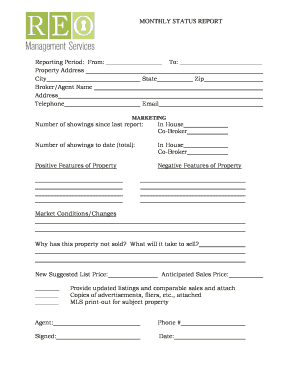
Get Monthly Status Report - Reo Property Management Uniffi
How it works
-

Open form follow the instructions
-

Easily sign the form with your finger
-

Send filled & signed form or save
How to fill out the MONTHLY STATUS REPORT - REO Property Management Uniffi online
Filling out the Monthly Status Report for REO property management is a crucial task for effective communication and property tracking. This guide provides clear, step-by-step instructions to help users complete the form accurately and efficiently.
Follow the steps to fill out the Monthly Status Report accurately.
- Click the ‘Get Form’ button to access the report and open it for editing.
- Fill in the reporting period by providing the start date in the designated fields at the top of the form.
- Enter the property address, city, state, and zip code in their respective fields to ensure accurate location information.
- Provide the broker/agent's name, address, telephone number, and email address to facilitate communication.
- In the 'Marketing' section, indicate the number of property showings since the last report for both in-house and co-broker efforts.
- Next, fill in the total number of showings to date, again specifying in-house and co-broker showings.
- List the positive features of the property and the negative features to provide a balanced overview for potential buyers.
- Explain any changes in market conditions that may impact the sale of the property.
- Discuss why the property has not sold and what actions could lead to its sale.
- Suggest a new list price for the property in the provided field.
- Include an anticipated sales price to give further context to potential buyers or stakeholders.
- Provide updated listings, comparable sales, and attach any relevant copies of advertisements or marketing materials.
- Lastly, ensure to include the agent's name and phone number in the designated area, sign the document, and add the date.
- Once all sections are completed, save your changes, and choose options to download, print, or share the completed report.
Complete your Monthly Status Report online to enhance property management and communication!
Industry-leading security and compliance
US Legal Forms protects your data by complying with industry-specific security standards.
-
In businnes since 199725+ years providing professional legal documents.
-
Accredited businessGuarantees that a business meets BBB accreditation standards in the US and Canada.
-
Secured by BraintreeValidated Level 1 PCI DSS compliant payment gateway that accepts most major credit and debit card brands from across the globe.