Loading
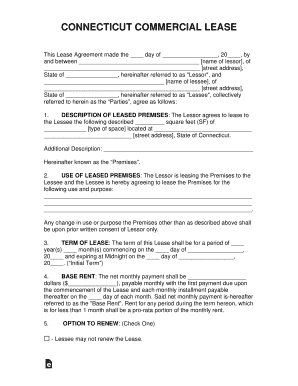
Get Ct Commercial Lease 2015-2026
How it works
-

Open form follow the instructions
-

Easily sign the form with your finger
-

Send filled & signed form or save
How to fill out the CT Commercial Lease online
Filling out the Connecticut Commercial Lease form online can streamline the leasing process for both lessors and lessees. This guide outlines each section of the lease, providing clear step-by-step instructions to help you complete the form with confidence.
Follow the steps to successfully fill out the CT Commercial Lease online.
- Click ‘Get Form’ button to obtain the lease form and open it in the editor.
- Start by entering the date of the agreement in the designated field. This should be the date when the lease is being signed.
- Fill in the names and addresses of the lessor and lessee in the appropriate fields. Ensure that all information is accurate as it will identify both parties legally.
- Describe the leased premises by entering the square footage and the type of space being leased. Include the complete address of the premises to avoid any confusion.
- Specify the intended use of the leased premises. Clearly state the purpose for which the premises will be utilized. This is crucial for compliance with any regulations.
- Indicate the lease term by specifying the number of years and months, along with the commencement and expiration dates. Be careful to calculate the term accurately.
- In the base rent section, enter the net monthly payment due. Ensure this amount is clearly defined and specify the due date for future payments.
- Choose whether the lessee has the option to renew the lease and specify the details regarding renewal periods, if applicable.
- Select the type of lease being agreed upon by checking the appropriate option for Gross, Modified Gross, or Triple Net Lease. Initial both parties where required.
- Input the required security deposit amount to ensure completeness of the lease terms. Ensure this amount is adequately agreed upon by both parties.
- Detail any leasehold improvements intended on the premises. Include conditions regarding consent from the lessor.
- Fill in requirements for licenses and permits as needed. It's important to show compliance with local regulations.
- Review the obligations of the lessee which include maintenance responsibilities and conditions of occupancy.
- Finalize the document by ensuring all signatures from both parties are included, along with the acknowledgement section that may require a notary.
- Once completed, save the changes, download the document for your records, and print it as necessary or share it electronically.
Complete your CT Commercial Lease online today!
Commercial leases tend to be longer term leases than residential. Residential leases generally max out at one year and then move to month to month. Commercial leases usually have a minimum period of one year, though typical leases are much longer than that.