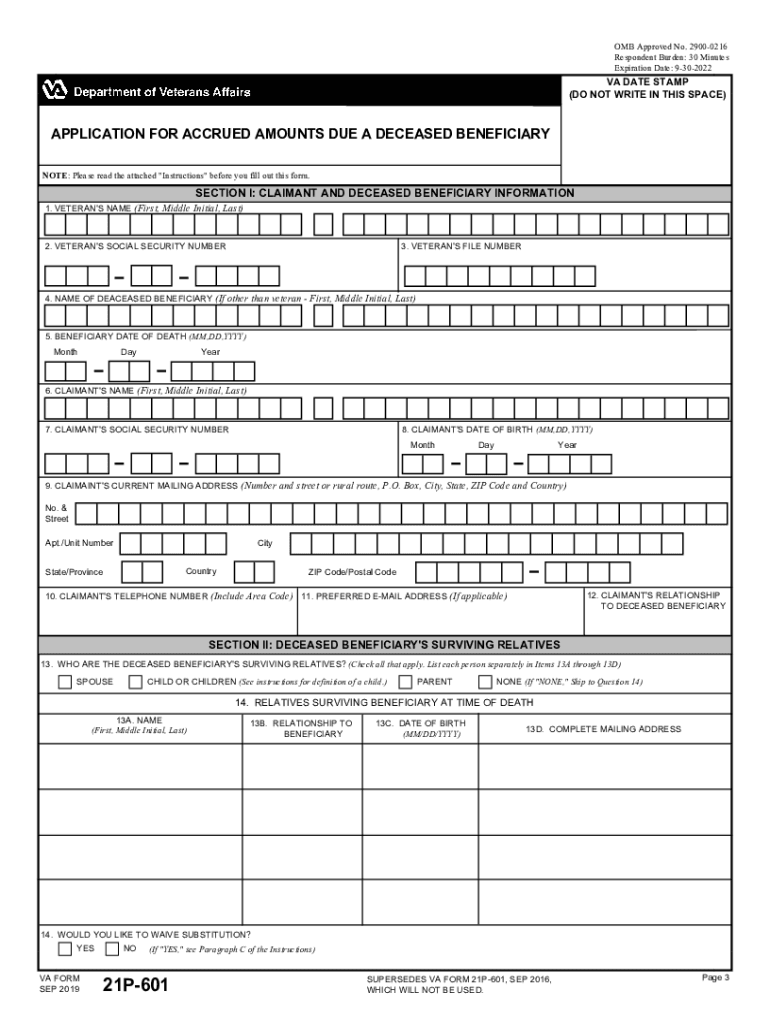
INSTRUCTIONS FOR VA FORM 21P601 APPLICATION FOR ACCRUED AMOUNTS DUE A DECEASED BENEFICIARY Note: Do not complete this form if you have applied for death benefits by using VA Form 21P534 or 21P535.

Open form follow the instructions

Easily sign the form with your finger

Send filled & signed form or save
How to use or fill out the Fillable VA Form 21-601 online
Filling out the Fillable VA Form 21-601 is an essential step for those seeking accrued amounts due to a deceased beneficiary. This guide provides a structured approach to completing the form online, ensuring that users can navigate the process with ease and confidence.
Follow the steps to complete VA Form 21-601 accurately.
- Press the ‘Get Form’ button to access the Fillable VA Form 21-601 online.
- Begin by entering the veteran's name in the designated field at the top of Section I. Ensure that you input the first name, middle initial, and last name accurately.
- Next, fill in the veteran's social security number and file number. These identifiers are essential for the processing of the claim.
- Provide the name of the deceased beneficiary if different from the veteran, along with their date of death in the specified format.
- Input your name, social security number, and date of birth in the claimant's information section. It is crucial for verifying your identity and relationship to the deceased.
- Complete the mailing address and include your telephone number and preferred email address for future correspondence.
- In Section II, check all applicable boxes to indicate the surviving relatives of the deceased beneficiary. List out their names and relationships.
- If you choose to waive the substitution, mark 'yes' or 'no' in the designated area. This decision impacts your claim processing.
- Proceed to Section III to list any expenses related to the last illness or burial. Record details such as the nature of the expense and whether it has been paid.
- If there are debts associated with the beneficiary, document them in the appropriate fields, ensuring accuracy in the amounts listed.
- Complete Section IV if applicable, certifying any unpaid creditor information and obtaining necessary signatures.
- In Section V, sign and date the form. Ensure your signature is in ink and, if necessary, have witnesses sign accordingly.
- After filling out the form, review all entries for accuracy. You can then save your changes, download the form, print it, or choose to share it online.
Complete your VA Form 21-601 online today to ensure eligibility for accrued benefits.
Experience a faster way to fill out and sign forms on the web. Access the most extensive library of templates available.
Related content
Step 2: Fill out the correct VA application forms. Again, some forms are required for...
Get answers to your most pressing questions about US Legal Forms API.
What VA claims get approved the most?
Most Commonly Approved VA Claims Tinnitus. Hearing Loss. Limitation of Flexion, Knee. Post-Traumatic Stress Disorder (PTSD) Lumbosacral or Cervical Strain (Back Pain) Scars, General. Paralysis of the Sciatic Nerve. Limitation of Range of Motion of the Ankle.
Can you submit VA forms online?
Frequently used VA forms You can now do many form-based tasks online, like filing a disability claim and applying for the GI Bill or VA health care. We'll walk you through the process step-by-step.
How to download VA forms online?
How to download and open a VA.gov PDF form Click the Download VA form link for the form you want to fill out. The PDF will download to your Downloads folder. ... Open Adobe Acrobat Reader. From the File menu, choose Open. Go to your Downloads folder or the location on your device where you saved the PDF.
How do I download a VA form?
How to download and open a VA.gov PDF form Click the Download VA form link for the form you want to fill out. The PDF will download to your Downloads folder. ... Open Adobe Acrobat Reader. From the File menu, choose Open. Go to your Downloads folder or the location on your device where you saved the PDF.
What is the easiest disability to get?
What Is the Most Approved Disability? Arthritis and other musculoskeletal system disabilities make up the most commonly approved conditions for social security disability benefits. This is because arthritis is so common. In the United States, over 58 million people suffer from arthritis.
What is the most common 100% VA disability?
ing to the VA's most recent annual report, the most common VA disability claims are awards for: Hearing loss. PTSD. Lumbosacral or cervical strain. Paralysis of the sciatic nerve. Scars (general) Limited range of motion for the ankle. Limited range of motion for the arm. Migraines.
Can you fill out VA forms online?
Frequently used VA forms You can now do many form-based tasks online, like filing a disability claim and applying for the GI Bill or VA health care. We'll walk you through the process step-by-step.
Can I download VA decision letter online?
No need to store hard copies or request reprints from VA. The ability to view and download your VA decision letters online saves you time.
How do I prove PTSD for VA disability?
To file a VA claim for combat PTSD, you'll be required to prove these three elements: You have a current medical diagnosis of PTSD (or other mental health condition) Your combat PTSD was caused by a stressor event during your military service, AND. You have a medical nexus that links your PTSD to the stressor event.
How do I write a PTSD statement for VA?
The stressor statement should describe the details of the traumatic event or events, including the time, place, and nature of the event, as well as any physical or emotional reactions experienced by the veteran at the time.
Use professional pre-built templates to fill in and sign documents online faster. Get access to thousands of forms.
If you believe that this page should be taken down, please follow our DMCA take down process here.