Loading
Form preview
  • US Legal Forms
  • Other Templates
  • More Forms
  • More Multi-State Forms
  • For Financial Aid Recipients With Unsatisfactory Academic Progress

Get For Financial Aid Recipients With Unsatisfactory Academic Progress

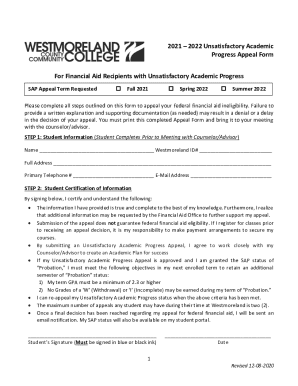
2021 2022 Unsatisfactory Academic Progress Appeal Form For Financial Aid Recipients with Unsatisfactory Academic Progress SAP Appeal Term RequestedFall 2021Spring 2022Summer 2022Please complete all.

How it works

  1. Open form

    Open form follow the instructions

  2. Easily sign form

    Easily sign the form with your finger

  3. Share form

    Send filled & signed form or save

How to fill out the For Financial Aid Recipients With Unsatisfactory Academic Progress online

Completing the For Financial Aid Recipients With Unsatisfactory Academic Progress form is essential for students seeking to appeal their financial aid ineligibility due to unsatisfactory academic performance. This guide provides clear, step-by-step instructions on how to fill out the form online, ensuring that you understand each section and can effectively communicate your circumstances.

Follow the steps to successfully fill out your appeal form

  1. Click the ‘Get Form’ button to obtain the necessary form and launch it in your online editor.
  2. Complete the 'Student Information' section by providing your full name, Westmoreland ID number, address, primary telephone number, and email address.
  3. In the 'Student Certification of Information' section, carefully read the statements provided. After verifying that the information is accurate, sign and date the form in black or blue ink.
  4. For the 'Appeal Information' section, indicate which extenuating circumstances apply to you. Be mindful that appeals without valid circumstances will be returned.
  5. Draft a written explanation of your extenuating circumstances. Provide thorough responses to questions regarding your academic progress and the changes that will support your future success.
  6. Fill out the 'Complete Academic Plan Form' section. Collaborate with your Counselor/Advisor to ensure your course selections will enable you to meet SAP standards.
  7. Ensure all sections are filled out correctly and that all signatures are in place. After your meeting, save changes, download the completed document, or print it for submission.

Take the next step toward appealing your financial aid status by completing your form online today.

Get form

Experience a faster way to fill out and sign forms on the web. Access the most extensive library of templates available.
Get form

Related content

Staying Eligible | Federal Student Aid
To keep receiving federal student aid, continue to meet basic eligibility criteria, make...
Learn more
Satisfactory Academic Progress for Financial Aid...
Standards of Satisfactory Academic Progress (SAP) for Financial Aid Eligibility Federal...
Learn more
Consumer Information Guide 2020-2021 - Webflow
8 Sep 2020 — C. How to Apply for Federal Financial Aid ... Frequency of Disbursement –...
Learn more

Related links form

Vendor Use Fuel Tax Return, BOE-501-AV - Board Of Equalization - Boe Ca Invoice Number: A Number That Identifies This Statement Services (Nursing) Unit PRESCRIPTION DRUG PROGRAM MAIL SERVICE FORM

Questions & Answers

Get answers to your most pressing questions about US Legal Forms API.

Contact support

How long does SAP restriction and/or probation last? Restriction: Lasts until an approved SAP appeal and/or you begin to meet SAP standards. Even if an appeal is approved, you may be put on a one-semester SAP probation in order to best monitor your academic progress.

Students must maintain a cumulative GPA of 2.0 or higher. Although this sounds like a low bar, one semester with poor academic performance can make it difficult for students to increase their cumulative GPA, and institutions' academic forgiveness programs don't reset a student's GPA for SAP purposes.

Valid reasons for an SAP appeal medical emergencies. severe health issues. severe personal or family problems. financial or personal catastrophe.

Satisfactory Academic Progress (SAP) standards ensure that you are successfully completing your coursework and can continue to receive financial aid. All students receiving financial aid are required to meet SAP standards.

A SAP appeal may be based on undue hardship when the failure to make satisfactory academic program is caused by the death of a relative of the student, severe personal injury or illness of the student, or other special circumstances determined by the school.

Most colleges allow appeals; some do not. Students must make the appeal in writing and must explain why they failed to maintain satisfactory academic progress. The appeal must also identify the changes in the student's situation that will allow them to satisfy the college's academic progress standards.

If your overall SAP Policy requirements are met at the end of the Financial Aid Warning semester, you will be removed from Financial Aid Warning and placed in “Good Standing” beginning with the next semester and will be eligible to receive federal aid if all other eligibility requirements have been met.

Students must meet and maintain certain requirements to continue to receive financial support, including adhering to their school's satisfactory academic progress (SAP) policy. Failure to do so could result in a financial aid warning or probation, which may affect your future eligibility for aid.

Get This Form Now!

Use professional pre-built templates to fill in and sign documents online faster. Get access to thousands of forms.
Get form
If you believe that this page should be taken down, please follow our DMCA take down processhere.
Get For Financial Aid Recipients With Unsatisfactory Academic Progress
Get form
  • Adoption
  • Bankruptcy
  • Contractors
  • Divorce
  • Home Sales
  • Employment
  • Identity Theft
  • Incorporation
  • Landlord Tenant
  • Living Trust
  • Name Change
  • Personal Planning
  • Small Business
  • Wills & Estates
  • Packages A-Z
  • Affidavits
  • Bankruptcy
  • Bill of Sale
  • Corporate - LLC
  • Divorce
  • Employment
  • Identity Theft
  • Internet Technology
  • Landlord Tenant
  • Living Wills
  • Name Change
  • Power of Attorney
  • Real Estate
  • Small Estates
  • Wills
  • All Forms
  • Forms A-Z
  • Other Templates
  • Legal Hub
  • About Us
  • Help Portal
  • Legal Resources
  • Blog
  • Affiliates
  • Contact Us
  • Delete My Account
  • Site Map
  • Industries
  • Forms in Spanish
  • Localized Forms
  • State-specific Forms
  • Forms Kit
  • Real Estate Handbook
  • All Guides
  • Notarize
  • Incorporation services
  • For Consumers
  • For Small Business
  • For Attorneys
  • USLegal
  • FormsPass
  • pdfFiller
  • signNow
  • altaFlow
  • DocHub
  • Instapage
Form Packages
  • Adoption
  • Bankruptcy
  • Contractors
  • Divorce
  • Home Sales
  • Employment
  • Identity Theft
  • Incorporation
  • Landlord Tenant
  • Living Trust
  • Name Change
  • Personal Planning
  • Small Business
  • Wills & Estates
  • Packages A-Z
Form Categories
  • Affidavits
  • Bankruptcy
  • Bill of Sale
  • Corporate - LLC
  • Divorce
  • Employment
  • Identity Theft
  • Internet Technology
  • Landlord Tenant
  • Living Wills
  • Name Change
  • Power of Attorney
  • Real Estate
  • Small Estates
  • Wills
  • All Forms
  • Forms A-Z
  • Other Templates
Customer Service
  • Legal Hub
  • About Us
  • Help Portal
  • Legal Resources
  • Blog
  • Affiliates
  • Contact Us
  • Delete My Account
  • Site Map
  • Industries
  • Forms in Spanish
  • Localized Forms
  • State-specific Forms
  • Forms Kit
Legal Guides
  • Real Estate Handbook
  • All Guides
Prepared for you
  • Notarize
  • Incorporation services
Our Customers
  • For Consumers
  • For Small Business
  • For Attorneys
Our Sites
  • USLegal
  • FormsPass
  • pdfFiller
  • signNow
  • altaFlow
  • DocHub
  • Instapage
Social Media
Call us now toll free:
+1 833 426 79 33
As seen in:
© Copyright 1999-2026 airSlate Legal Forms, Inc. 17 Station Street, Ste. 203, Brookline, MA 02445
  • Your Privacy Choices
  • Terms of Service
  • Privacy Notice
  • Content Takedown Policy
  • Bug Bounty Program