Loading
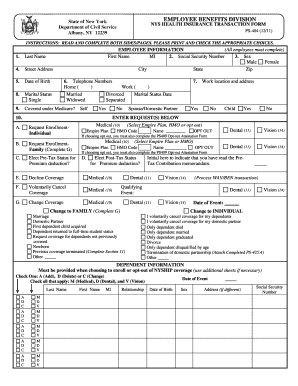
Get Nys Civil Service Ps 404r
How it works
-

Open form follow the instructions
-

Easily sign the form with your finger
-

Send filled & signed form or save
How to fill out the Nys Civil Service Ps 404r online
The Nys Civil Service Ps 404r form is essential for managing health insurance transactions for state employees. This guide provides clear, step-by-step instructions on how to accurately complete the form online to ensure your requests are processed efficiently.
Follow the steps to successfully fill out the Nys Civil Service Ps 404r form.
- Press the ‘Get Form’ button to access the online version of the Nys Civil Service Ps 404r form and open it in the editing tool.
- Begin by filling out the employee information section. Include your first name, middle initial, last name, social security number, date of birth, and sex. Ensure the information is accurate to avoid processing delays.
- Provide your street address, city, state, and zip code. This information is vital for correct identification and communication.
- Enter your telephone numbers in the designated fields, including both home and work numbers if applicable.
- Indicate your marital status by checking the appropriate box. Options include single, married, divorced, widowed, or separated.
- Next, indicate whether you are covered under Medicare. This helps in determining your eligibility for certain benefits.
- In the enter requests section, select your desired enrollment option (individual or family). If you are opting for family coverage, be prepared to complete additional sections.
- Choose the type of coverage you want, such as medical, dental, or vision. Ensure you understand the options available and your selection aligns with your needs.
- If applicable, answer yes or no regarding pre-tax and post-tax status for premium deductions.
- In the dependent information section, list any dependents you wish to enroll or opt-out of coverage. Correctly mark if you want to add, delete, or change information related to each dependent.
- Review the previous coverage information if you have previously been covered under another health plan. Attach any necessary proof of your former coverage.
- Complete the leave without pay and retirement section if it applies to your situation. Indicate your preferences regarding continuing coverage during leave.
- Finally, sign the authorization section to confirm the accuracy of your information and your understanding of the consequences of errors or omissions.
- Once you have reviewed the completed form for accuracy, save your changes. You can then download, print, or share the form as needed.
Complete your Nys Civil Service Ps 404r document online to ensure timely processing of your health insurance transactions.
Related links form
Call toll-free 866-805-0990, long-distance within the 50 states, Puerto Rico and Virgin Islands. Call 518-474-7736 locally within the Albany, New York area.