Loading
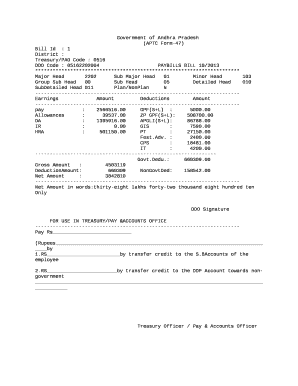
Get Aptc Form 47
How it works
-

Open form follow the instructions
-

Easily sign the form with your finger
-

Send filled & signed form or save
How to fill out the Aptc Form 47 online
Filling out the Aptc Form 47 online can be a straightforward process with the right guidance. This guide provides step-by-step instructions to help users, regardless of their prior experience, complete the form accurately and efficiently.
Follow the steps to fill out the Aptc Form 47 online.
- Press the ‘Get Form’ button to access the form and open it in your editing interface.
- Begin by entering your district information in the appropriate field. Ensure this detail is accurate as it is essential for processing the form.
- Next, input the Treasury/PAO Code and DDO Code as provided in your documents. This information is crucial for the financial transactions associated with your submission.
- Proceed to fill in the major head, sub major head, and minor head fields. Each entry must align with the categories defined in your budget or financial plan.
- Detail the earnings section by inputting relevant amounts for various categories, such as pay, allowances, and other earnings. Make certain to double-check the figures for accuracy.
- Move on to the deductions section, where you will list all applicable deductions, including GPF, APGLI, GIS, and any non-government deductions. This information must reflect all required withholdings accurately.
- At the gross amount field, sum up your total earnings and subtract the total deductions to derive the net amount.
- In the final fields, ensure that the net amount is clearly stated in both numerical and word form for clarity. This section is crucial for financial validation.
- Before completing the process, review all entries for accuracy. Once confirmed, you may save changes to the form, download it, print a hard copy, or share it as needed.
Start filling out your Aptc Form 47 online today for a seamless submission experience.
Industry-leading security and compliance
US Legal Forms protects your data by complying with industry-specific security standards.
-
In businnes since 199725+ years providing professional legal documents.
-
Accredited businessGuarantees that a business meets BBB accreditation standards in the US and Canada.
-
Secured by BraintreeValidated Level 1 PCI DSS compliant payment gateway that accepts most major credit and debit card brands from across the globe.