Loading
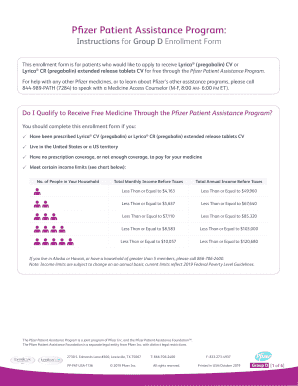
Get Assistance Program Application // Reade.43daydrive.xyz
How it works
-

Open form follow the instructions
-

Easily sign the form with your finger
-

Send filled & signed form or save
How to fill out the Assistance Program Application online
This guide provides comprehensive instructions on how to complete the Assistance Program Application effectively. Follow these steps to ensure a smooth application process and increase your chances of receiving the assistance you need.
Follow the steps to fill out your application accurately.
- Click the ‘Get Form’ button to access the application. This will allow you to download and open the enrollment form in your preferred editor.
- Read the eligibility requirements carefully to ensure that you qualify for assistance. Ensure you have the required documentation ready to support your application.
- Fill out the 'Patient Information' section of the form. Provide your full name, mailing address, contact information, date of birth, and the total number of people living in your household.
- Provide detailed information about your annual household income. You must include documentation such as your previous year's tax return or recent pay stubs to verify this information.
- In the 'Prescription Coverage Information' section, indicate whether you have prescription coverage. If yes, provide additional details as required.
- Read and sign the 'Patient Privacy and Consent' section, which affirms that the information you provided is accurate and that you cannot afford the medication.
- Gather the required documents, including the completed enrollment form, a photocopy of your most recent government-issued ID, and your prescription.
- Submit the completed form along with all necessary documents to your prescriber, who will then send the application to the Pfizer Patient Assistance Program.
- After submitting your application, expect to receive a notification regarding your status within 2-3 weeks. You can then save the application, download it for your records, or share it with relevant parties.
Complete your application online today to take the first step toward receiving the assistance you need.
Related links form
Gener Risk Capacity Al (G), Total Risk Total Risk In People PSN 2 Capacity In Capacity (ft ) (Does
Retrofi General (G), Tted Total Risk Risk Capacity Total Risk PSN Capacity (R) Or Capacity (ft2) In
Retrofit Ted (R) Or New Constru Ction (N) Genera Risk Total Risk L (G), Total Risk Capacity
Retrofit Ted (R) Or New Constru Ction (N) Risk General Total Risk Capacity Total Risk 2 (G), PSN
Under Review This status means that your application has been assigned to a Reviewer and the review process will begin soon. Pending Applicant Information: During the review process, your Reviewer determined critical applicant information to be missing from your file.
Industry-leading security and compliance
US Legal Forms protects your data by complying with industry-specific security standards.
-
In businnes since 199725+ years providing professional legal documents.
-
Accredited businessGuarantees that a business meets BBB accreditation standards in the US and Canada.
-
Secured by BraintreeValidated Level 1 PCI DSS compliant payment gateway that accepts most major credit and debit card brands from across the globe.