Loading
Get Sc Scca/733a 2016
How it works
-

Open form follow the instructions
-

Easily sign the form with your finger
-

Send filled & signed form or save
How to fill out the SC SCCA/733A online
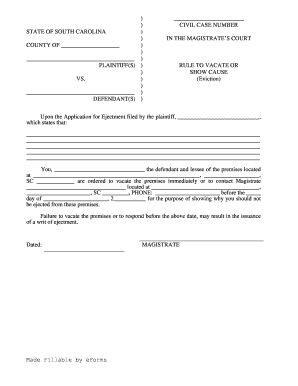
This guide provides you with clear and supportive instructions on how to complete the SC SCCA/733A form online. By following these steps, you will ensure that your filing is accurate and complete.
Follow the steps to successfully complete the SC SCCA/733A form online.
- Select the ‘Get Form’ button to access the SC SCCA/733A form and open it for editing.
- Begin by entering the county name in the designated area at the top of the form.
- Fill in the names of the plaintiffs in the provided blank space under 'PLAINTIFF(S)'. This should include all parties involved in the case.
- In the section labeled 'DEFENDANT(S)', list the names of the defendants similarly to how you listed the plaintiffs.
- Locate the section for 'CIVIL CASE NUMBER' and input the appropriate case number, if assigned.
- In the body of the form, specify the details of the application for ejectment, ensuring that you include necessary information that clearly states your case.
- Fill out the defendant's information, including their name, the premises they are occupying, and the full address, ensuring accuracy for proper legal processing.
- Identify the magistrate’s name and their contact information in the appropriate sections to provide clear instructions for communication.
- Enter the deadline date for the defendant's response in the specified area.
- Review all provided information carefully for clarity and correctness before finalizing.
- Once everything is complete, save your changes, then download or print the document for your records or submission.
Complete your SC SCCA/733A form online to ensure a smooth legal process.
Get form
Experience a faster way to fill out and sign forms on the web. Access the most extensive library of templates available.
Get This Form Now!
Use professional pre-built templates to fill in and sign documents online faster. Get access to thousands of forms.