Loading
Get Certificat De Livraison Directe - Danavideomedia.com
How it works
-

Open form follow the instructions
-

Easily sign the form with your finger
-

Send filled & signed form or save
How to fill out the CERTIFICAT DE LIVRAISON DIRECTE - Danavideomedia.com online
The CERTIFICAT DE LIVRAISON DIRECTE is an essential document for certifying the possession and delivery of goods. In this guide, you will find clear instructions on how to fill out the form online, ensuring that all necessary information is accurately provided.
Follow the steps to complete the CERTIFICAT DE LIVRAISON DIRECTE online.
- Click the ‘Get Form’ button to access the form and open it in your preferred online editor.
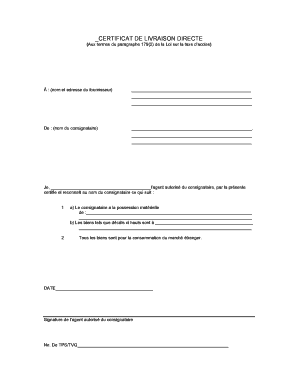
- In the section labeled 'À :', enter the name and address of the supplier. Make sure to provide complete and accurate information.
- In the section labeled 'De :', write the name of the consignee. This should also be a complete name.
- In the statement beginning with 'Je,', specify your full name as the authorized agent of the consignee.
- Next, under subsection a), indicate what the consignee is in possession of by describing the goods clearly.
- In subsection b), specify where the described goods are intended for use, ensuring clarity in the delivery address.
- Confirm that all goods are meant for consumption in a foreign market as stated.
- Finally, enter the date on which the document is being completed, followed by the authorized agent's signature.
- Include the TPS/TVQ number in the designated section which is necessary for tax purposes.
- Once you have filled out all sections, you may choose to save changes, download, print, or share the completed form.
Start filling out your document online today for a streamlined process!