Loading
Get Provider/facility Update Form - New Directions Behavioral Health
How it works
-

Open form follow the instructions
-

Easily sign the form with your finger
-

Send filled & signed form or save
How to fill out the Provider/Facility Update Form - New Directions Behavioral Health online
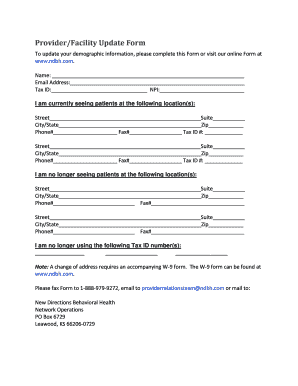
Completing the Provider/Facility Update Form is an essential process for updating your demographic information with New Directions Behavioral Health. This guide provides clear and supportive instructions to help you fill out the form accurately and efficiently.
Follow the steps to complete the Provider/Facility Update Form online.
- Press the ‘Get Form’ button to acquire the form and open it in the editor.
- In the 'Name' field, enter your full name as it appears in your professional documentation.
- Enter your email address in the designated field to ensure you receive any relevant notifications.
- Fill in your Tax Identification Number (Tax ID) in the appropriate section.
- Provide your National Provider Identifier (NPI) number to assist with your identification.
- Indicate the locations where you are currently seeing patients. For each location, fill in the street address, suite number (if applicable), city, state, and zip code. Do not forget to provide a phone number and fax number for each location.
- List the locations where you are no longer seeing patients, similarly filling in all required fields for each past location.
- If applicable, enter any Tax ID numbers you are no longer using.
- Note that a change of address requires an accompanying W-9 form. Ensure to obtain this form if necessary.
- Once you have completed all sections, you can save your changes, print the form, or share it as needed. Remember to fax the completed form to 1-888-979-9272, email it to providerrelationsteam@ndbh.com, or mail it to the address provided.
Start updating your information online by completing the Provider/Facility Update Form now.
Related links form
Announcement 2001-109 - Availability Of Revised Determination Letter Forms. Revision Of Forms 5300
Announcement 2001-95 - Deletions From Cumulative List Of Organizations Contributions To Which Are
Regulation 103735-00 - Modification Of Tax Shelter Rules II. Temporary And Proposed Regulations
Announcement 2001-74 - New Filing Locations For Estate, Gift, And Generation-Skipping Transfer Tax