Loading
Get Namaqualand Campus
How it works
-

Open form follow the instructions
-

Easily sign the form with your finger
-

Send filled & signed form or save
How to fill out the Namaqualand Campus online
Completing the Namaqualand Campus enrollment form online is a straightforward process designed to gather essential information about prospective students. This guide provides clear, step-by-step instructions to help users effectively fill out the form.
Follow the steps to successfully complete your enrollment form.
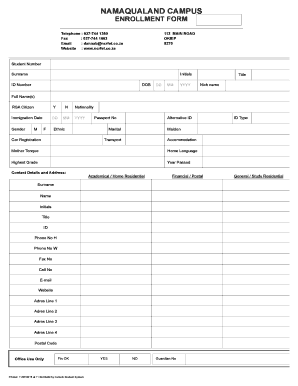
- Press the ‘Get Form’ button to access the enrollment form and open it in your preferred editor.
- Begin by entering your student number, surname, initials, and ID number in the designated fields. Ensure the information is accurate as it is critical for your enrollment.
- Fill in your date of birth using the provided drop-down menus for day, month, and year. Specify your title and optional nickname.
- Provide your full name(s) and indicate whether you are a South African citizen by selecting 'Y' for yes or 'N' for no.
- If applicable, enter your immigration date using the specified format. Indicate your gender by selecting either 'M' for male or 'F' for female.
- Fill out your nationality, passport number, and ethnic background as required. Additionally, provide details about your car registration and alternative ID if necessary.
- Indicate your marital status and maiden name if relevant. Further, provide information about your transport and accommodation preferences.
- Specify your mother tongue and home language. Indicate the highest grade you have completed and the year you passed.
- Enter your contact details, including your academic or residential address. Ensure to complete all fields, such as surname, title, phone numbers, email, and address lines.
- Complete the next of kin information, providing the required details including surname, relationship, and contact information.
- Select your student type, such as private, employer, or bursary. Fill in the necessary registration information related to your campus, course, and study direction.
- Sign the declaration confirming the accuracy of the provided information and acknowledge adherence to college rules. If applicable, a parent or guardian must also sign.
- Once you have filled out all sections, review the form for accuracy and completeness before saving your changes, downloading, printing, or sharing the form as needed.
Take the next step in your education by completing the Namaqualand Campus enrollment form online today.
The courses currently offered are National Diplomas in Agricultural Management, Tourism Management, Internal Auditing, Marketing Management, Retail Business Management, Human Resources Management and Cost & Management Accounting.
Industry-leading security and compliance
US Legal Forms protects your data by complying with industry-specific security standards.
-
In businnes since 199725+ years providing professional legal documents.
-
Accredited businessGuarantees that a business meets BBB accreditation standards in the US and Canada.
-
Secured by BraintreeValidated Level 1 PCI DSS compliant payment gateway that accepts most major credit and debit card brands from across the globe.