Loading
Get Dubai First Dispute Form
How it works
-

Open form follow the instructions
-

Easily sign the form with your finger
-

Send filled & signed form or save
How to fill out the Dubai First Dispute Form online
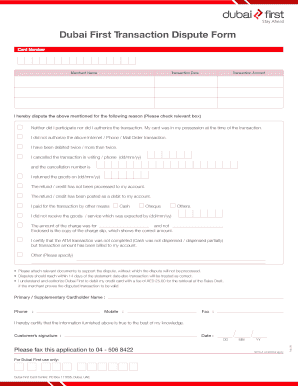
This guide provides clear and detailed instructions for users looking to fill out the Dubai First Dispute Form online. By following these steps, users can ensure that their dispute is submitted accurately and efficiently.
Follow the steps to complete the Dubai First Dispute Form online.
- Click ‘Get Form’ button to obtain the form and open it in the editor.
- Begin by entering your card number in the designated field. Ensure the number is accurate and free of errors to facilitate processing.
- Next, input the merchant name under which the disputed transaction occurred.
- Fill in the transaction date, ensuring you use the correct format to avoid any delays.
- Specify the transaction amount to clarify the dispute. Double-check that this amount matches your records.
- Indicate the reason for your dispute by checking the relevant box. You may check more than one box if applicable.
- If applicable, provide details regarding your cancellation, including the date and cancellation number.
- List the method of payment used for the transaction by checking the appropriate box, such as cash or cheque.
- If you did not receive the goods or services, provide the expected delivery date and additional details if necessary.
- Attach any relevant documents that support your dispute, as these are required for processing the claim.
- Finally, review your completed form for accuracy, then save your changes, download a copy for your records, or print the form if needed.
Complete your dispute submission online to ensure a smooth resolution process.
Call our 24/7 contact centre on 04-5068888 for assistance to activate your card and set your PIN.