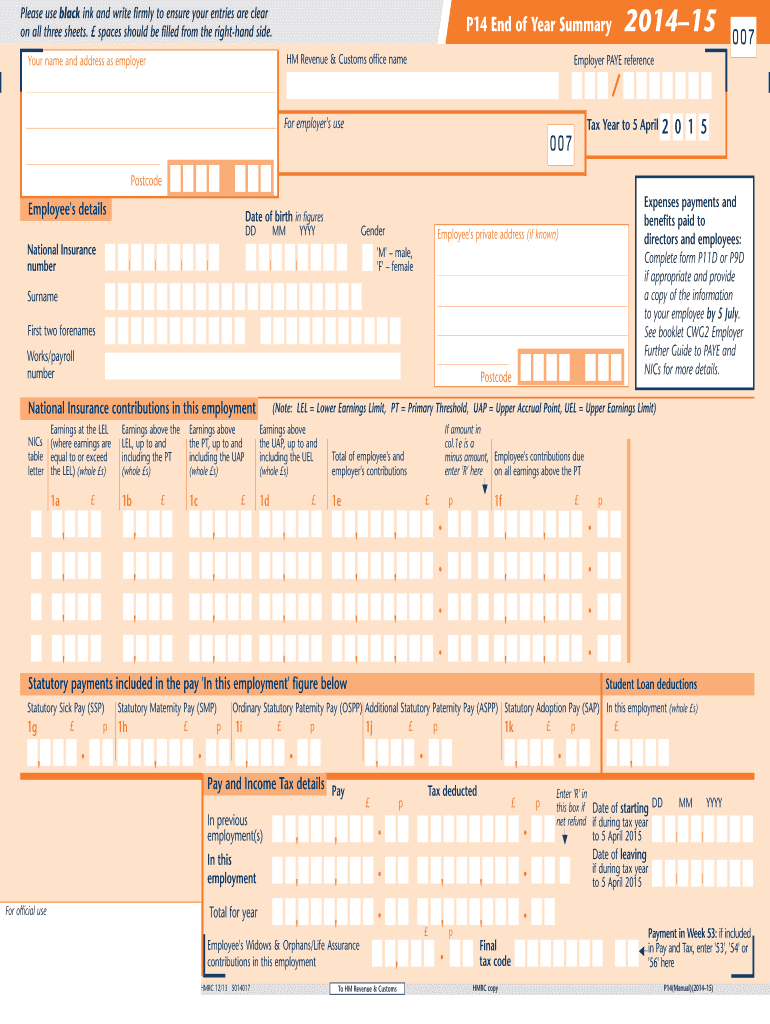
name Your name and address as employer 2014–15 007 Employer PAYE reference For employer's use Tax Year to 5 April 007 2 0 1 5 Postcode Employee's details Expenses payments and benefits paid to directors and employees: Complete form P11D or P9D if appropriate and provide a copy of the information to your employee by 5 July. See booklet CWG2 Employer Further Guide to PAYE and NICs for more details. Date of birth in figures DD MM YYYY Gender National Insurance number Employee's .
Loading

Open form follow the instructions

Easily sign the form with your finger

Send filled & signed form or save
How to fill out the UK HMRC P14/P60 online
Filing the HMRC P14/P60 forms online is imperative for both employers and employees to ensure accurate reporting of earnings and tax information. This guide provides a comprehensive walkthrough to assist users in completing these essential forms with clarity and confidence.
Follow the steps to fill out the P14/P60 online effectively.
- Click ‘Get Form’ button to obtain the form and open it in the editor.
- Begin by entering your employer's name and address at the top of the form. Ensure the details are accurate and match your official documentation.
- Fill in the employer PAYE reference number, which is crucial for tax purposes.
- Indicate the tax year by entering the dates in the provided format, ensuring you are focused on the correct tax year to 5 April.
- Provide employee details, including their name, address, and National Insurance number, as well as their date of birth and gender. Be mindful to fill in all fields correctly.
- Fill out the earnings section, including figures for earnings at the LEL (Lower Earnings Limit) and above, breaking down amounts by set thresholds: PT (Primary Threshold), UAP (Upper Accrual Point), and UEL (Upper Earnings Limit). Use whole £ amounts.
- Input any statutory payments related to maternity, sick, paternity, or adoption pay included in the pay figures.
- Complete the pay and income tax details, entering both the total pay and the tax deducted for the year.
- If applicable, indicate if there is a refund or adjustments to employee contributions required.
- Review all entered information for accuracy, save your changes, and finally download or print the completed form for your records.
Be sure to complete your documents accurately online today!
Experience a faster way to fill out and sign forms on the web. Access the most extensive library of templates available.
Related content
These documents show your tax code and an estimate of your income and tax deductions...
get uk hmrc p14 p60 2014 2023 us legal forms - Jan 05 2023 web complete uk hmrc p14 p60...
Oct 9, 2015 — We group our 33 country businesses into three regions: Asia Pacific;...
Get answers to your most pressing questions about US Legal Forms API.
Is P14 the same as P60?
As mentioned earlier, while the P14 and P60 are related, they differ fundamentally in function. The P14 focuses on detailing earnings and taxes for each employee throughout the year, while the P60 provides a summary of that information at the end of the tax year. Understanding these distinctions allows individuals and businesses to handle tax reporting more effectively. Again, US Legal Forms is a helpful resource for clarifying these processes.
Does a P14 still exist?
Yes, the P14 form continues to exist but is now integrated into the new Real Time Information (RTI) system. Employers now report employee information in real-time, but the P14 remains vital during the transition as a historical reference. It is crucial to stay updated on any changes in HMRC reporting requirements, ensuring compliance and proper documentation.
Who submits a P14?
Employers are responsible for submitting the P14 for each employee annually to HMRC. This submission is part of the end-of-year payroll processes and is essential for accurate tax reporting. Properly handling P14 submissions can prevent tax discrepancies and potential penalties. Utilizing services like US Legal Forms can streamline this submission and offer guidance through the process.
Is P14 same as P60?
While both the P14 and P60 forms relate to employee taxation, they are not the same. The P14 supports previous submissions by providing detailed earnings for every employee during the tax year, whereas the P60 is an annual summary of all tax deductions made from the employee's earnings. Understanding the difference between the UK HMRC P14 and P60 is essential for both employers and employees for accurate tax reporting.
Can I view my P60 online UK?
Yes, you can view your P60 online in the UK through your personal tax account on the HMRC website. Once you log in, all your necessary tax information will be available for you to download. This convenience allows you to manage your tax documents effectively and ensures you always have access to important records like the UK HMRC P14/P60. Ensuring you have electronic copies can also be beneficial for your future financial planning.
How do I get my full employment history in the UK online?
To acquire your full employment history in the UK online, visit the GOV.UK website and request a copy of your employment record. By providing your details, you can access various employment documents, including P60s from different employers. This information may help you review your employment and tax status over the years. Using tools like USLegalForms can streamline this process if you need further assistance with managing your UK HMRC P14/P60.
How do I access my P60 online in the UK?
You can access your P60 online by logging into your personal tax account on the HMRC website. This account contains all essential documents, including your P60, which shows your annual income and tax deductions. After logging in, simply navigate to the section for tax documents, where you'll find your P60 ready for download. Remember, keeping track of your UK HMRC P14/P60 is essential for proper tax management.
What does the refund mark R mean on P60?
The refund mark R on your P60 indicates that HMRC processed a repayment of tax during the tax year. This means that you may have overpaid your taxes or are eligible for a refund due to changes in your income or tax code. It is essential to review your P60 carefully, especially if you see this mark, as it might impact your tax obligations moving forward. For further clarification, consider checking resources related to UK HMRC P14/P60.
What is P14 form in UK?
The P14 form in the UK is documentation that an employer submits to HMRC, reporting an employee's tax deductions and earnings for the year. This form is an essential part of the UK's payroll process, providing clarity for tax assessments. It plays a vital role in the tax calculation process, along with the UK HMRC P14/P60 forms.
How to get P14?
To obtain a P14, you should contact your employer directly. They are required to provide this form for you if you were employed by them during the financial year. It's crucial to ensure that your P14 is accurate, as it is used for tax filings with HMRC.
Use professional pre-built templates to fill in and sign documents online faster. Get access to thousands of forms.
If you believe that this page should be taken down, please follow our DMCA take down process here.