Loading
Get Parent Information Sheet
How it works
-

Open form follow the instructions
-

Easily sign the form with your finger
-

Send filled & signed form or save
How to fill out the Parent Information Sheet online
Filling out the Parent Information Sheet online is a straightforward process that allows you to provide essential contact information for guardians regarding a student's education. By following these instructions, you will ensure that your information is submitted accurately and efficiently.
Follow the steps to complete the Parent Information Sheet online
- Click ‘Get Form’ button to obtain the form and open it in the online editor.
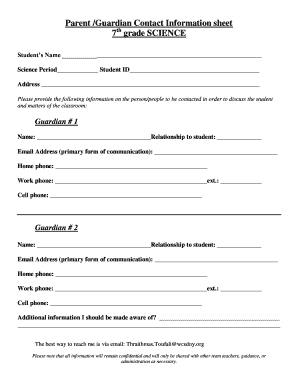
- Begin by entering the student's name clearly in the designated field at the top of the form. This ensures that the information is accurately associated with the correct student.
- Next, fill out the science period and student ID fields. This information helps teachers identify the period the student is in and track records accordingly.
- Provide the home address of the student in the specified section. Ensure that the address is complete and accurate for any relevant communications.
- In the section for Guardian #1, fill in the guardian's name and relationship to the student. This information is crucial for establishing contact protocols.
- Enter the email address of Guardian #1, as this will be the primary method of communication. Make sure that the address is spelled correctly to avoid miscommunication.
- Complete the fields for home phone, work phone, and cell phone for Guardian #1. It is advisable to provide at least two forms of contact.
- Repeat steps 5 to 7 for Guardian #2 to ensure that there is a secondary point of contact in case Guardian #1 is unreachable.
- In the additional information section, provide any pertinent details that the teachers or administration should be aware of regarding the student’s needs or circumstances.
- Finally, review all the information entered to confirm its accuracy. Once satisfied, you can save your changes, download the form, print it, or share it as needed.
Complete your Parent Information Sheet online today to ensure effective communication about your student's education.
2. Add your child's school account On your child's device, open Google Classroom . Tap Get Started. Choose your child's Google Account or select Add account. Tap Next. Select the account you use with Google Classroom to give parent permission. Follow the on-screen instructions.