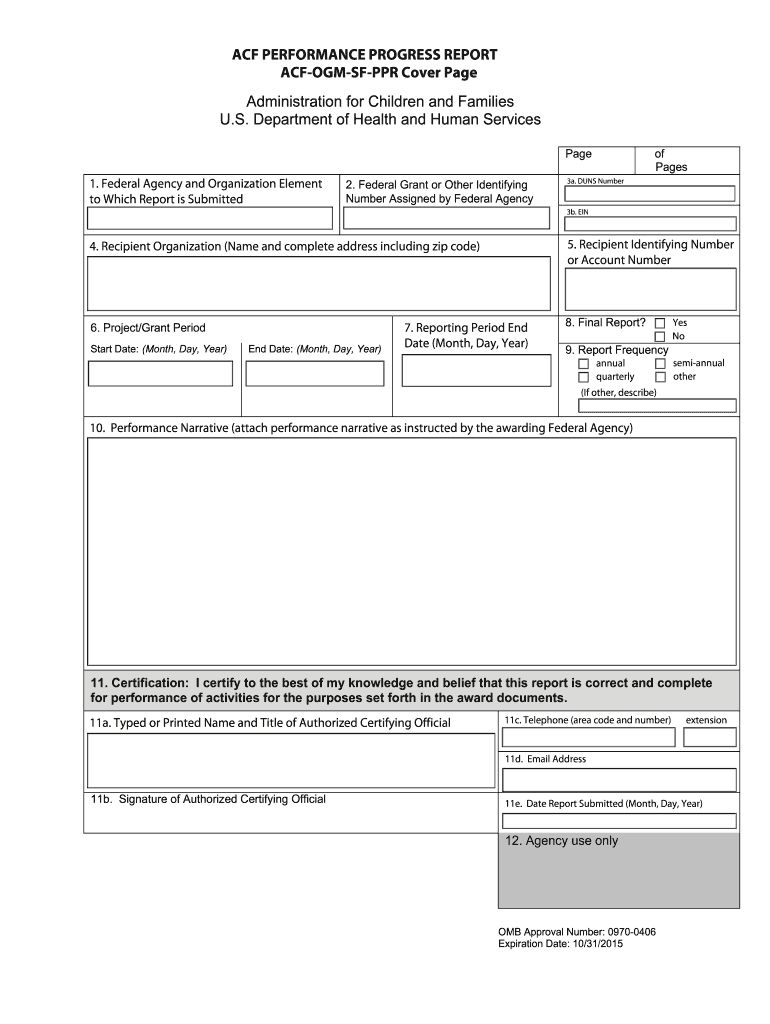
Erformance Narrative Enter the grant/award number contained in the award document. Enter the recipient organization’s Data Universal Numbering System (DUNS) number or System for Award Management (SAM) extended DUNS Number. Enter the recipient organization’s Employer Identification Number (EIN) provided by the Internal Revenue Services. Enter the name of recipient organization and address, including zip code. Mark appropriate box. Check “yes” only if this is the final report for the pr.
Loading

Open form follow the instructions

Easily sign the form with your finger

Send filled & signed form or save
How to fill out the ACF-OGM-SF-PPR Cover Page online
This guide provides clear and detailed instructions on how to accurately complete the ACF-OGM-SF-PPR Cover Page online. With each step outlined, users can confidently navigate through the required fields to ensure proper submission.
Follow the steps to successfully complete your cover page.
- Select the ‘Get Form’ button to access the ACF-OGM-SF-PPR Cover Page and open it in your preferred editor.
- In the first section, enter the name of the awarding Federal agency and the organizational element. This information should match what is provided in the award document or as instructed by the agency.
- In the next field, input the Federal grant or other identifying number assigned by the Federal agency, which is typically found in the award documentation.
- Provide the DUNS number of the recipient organization. This is the Data Universal Numbering System identifier that is crucial for grant management.
- Enter the Employer Identification Number (EIN) assigned to the recipient organization by the Internal Revenue Service to facilitate identification for tax purposes.
- Next, fill in the recipient organization’s name and complete address, ensuring that you include the zip code accurately.
- Specify the project or grant period by entering both the start and end dates in the format (Month, Day, Year) as specified in the award document.
- Input the reporting period end date following the same date format. For quarterly, semi-annual, or annual reports, use standard calendar quarter end dates.
- Indicate whether this is the final report for the specified project/grant period by checking ‘Yes’ or ‘No’ in the appropriate box.
- Select the reporting frequency as outlined in your award document (annual, quarterly, semi-annual, or other). If you select 'other', provide a brief explanation.
- Prepare and attach the performance narrative as directed by the awarding Federal agency, ensuring you follow any specific instructions given.
- Lastly, in the certification section, confirm the accuracy of the report by including the typed name, title, signature, and contact information of the authorized certifying official, along with the date the report is submitted.
Complete your ACF-OGM-SF-PPR Cover Page online today for accurate and efficient documentation.
Experience a faster way to fill out and sign forms on the web. Access the most extensive library of templates available.
Related content
Leave blank and complete Form ACF-OGM SF PPR Attachment B. Page 3. ACF PERFORMANCE...
by NHF Beebe · 2025 — Front cover. IEEE. Spectrum, 57(2):c1, February. 2020. CODEN...
Get answers to your most pressing questions about US Legal Forms API.
What should a cover page include?
Every cover page must include essential elements such as the report title, the names of contributors, and relevant dates. In the case of the ACF-OGM-SF-PPR Cover Page, integrating identification details enhances transparency and effectiveness. Remember, a thoughtful cover page sets the tone for the entire report, making it an important aspect of your documentation.
What should be on a report cover page?
A report cover page should display the title clearly, along with the author's name and contact details. Additionally, for the ACF-OGM-SF-PPR Cover Page, include a brief description of the document's purpose. By organizing important information in a user-friendly format, you make it easier for readers to understand and access the content of your report.
What to include in a report cover page?
When creating a report cover page, include the title of the document, the names of the parties involved, and the date of the report. The ACF-OGM-SF-PPR Cover Page should also feature relevant identification numbers or codes, which help to streamline record-keeping. A well-structured cover page builds credibility and enhances the reader's experience.
Use professional pre-built templates to fill in and sign documents online faster. Get access to thousands of forms.
If you believe that this page should be taken down, please follow our DMCA take down process here.