Loading
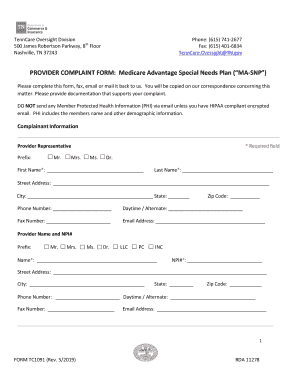
Get Tn Form Tc1091 2019-2025
How it works
-

Open form follow the instructions
-

Easily sign the form with your finger
-

Send filled & signed form or save
How to fill out the TN Form TC1091 online
Filling out the TN Form TC1091 online is a straightforward process designed to assist users in submitting their complaints effectively. This guide provides clear, step-by-step instructions to ensure that you complete the form accurately and reliably.
Follow the steps to fill out the form completely and correctly.
- Click 'Get Form' button to obtain the form, and open it in the editor to start filling it out.
- Begin with the complainant information section. Input the prefix and fill in the required fields with your first name, last name, street address, city, state, zip code, phone number, alternate contact number, fax number (if applicable), and email address. Ensure that all required fields are completed.
- Move on to the provider information section. Enter the prefix and complete the required information, including the provider's name, NPI number, address, city, state, zip code, phone number, alternate contact number, fax number, and email address.
- In the MA-SNP Plan Information section, select the managed care company or managed care organization you are filing a complaint against. Provide the relevant type of service and specify your provider type, such as hospital, physician, or nursing facility.
- Fill out the enrollee’s name and date of birth if applicable. If there are multiple enrollees, indicate that their names and dates of birth will be included in the supporting documentation.
- Indicate the date(s) of service received. Specify the start date and end date of the services in question.
- Select the reasons for your complaint from the options provided. You may choose multiple reasons if applicable.
- Provide a detailed written description of the issue. Include all pertinent information and attach copies of necessary documentation to support your complaint.
- If your complaint involves claim denials or recoupments for services affecting five or more members, prepare an electronic Excel spreadsheet with required details and ensure it is presented in an encrypted format.
- Clearly state what action you would like the TennCare MCC or TennCare Bureau to take regarding your complaint.
- If you are not the aggrieved provider, specify your relationship to the provider in the appropriate section.
- Finally, declare that the information you have provided is true and accurate. Signature and date are required to confirm the authenticity of your submission.
- Once you have completed all sections, you can save your changes, download the form, print a copy for your records, or share the form as needed.
Complete your TN Form TC1091 online today to ensure that your complaint is handled efficiently.
Industry-leading security and compliance
US Legal Forms protects your data by complying with industry-specific security standards.
-
In businnes since 199725+ years providing professional legal documents.
-
Accredited businessGuarantees that a business meets BBB accreditation standards in the US and Canada.
-
Secured by BraintreeValidated Level 1 PCI DSS compliant payment gateway that accepts most major credit and debit card brands from across the globe.