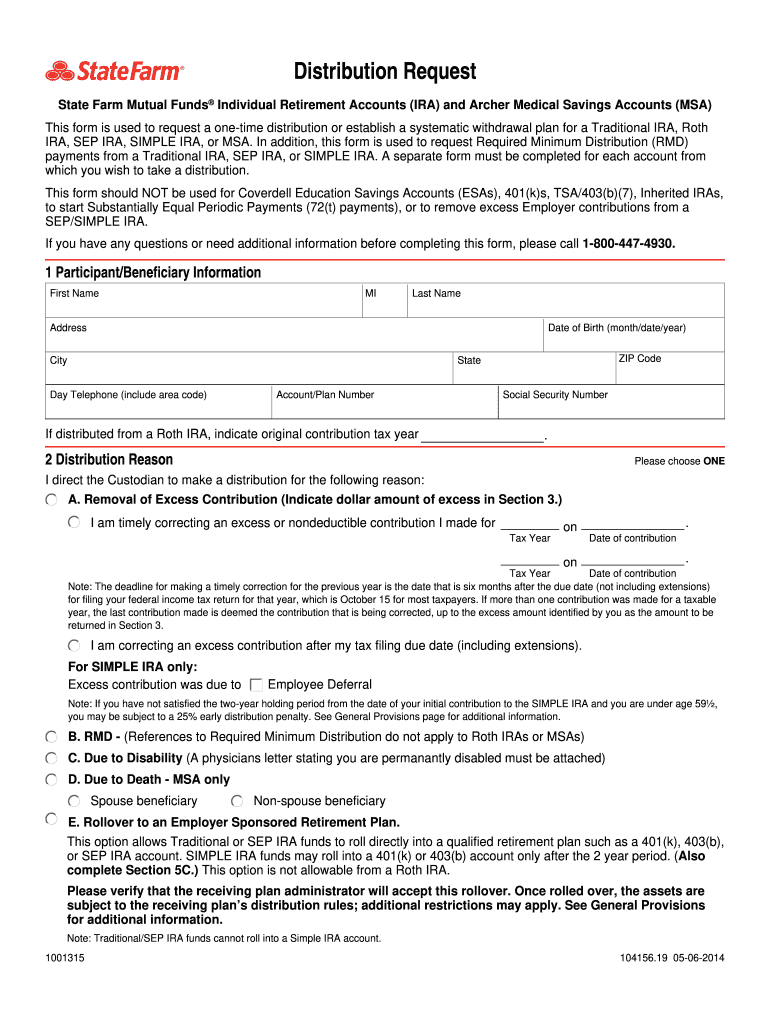
subject to the receiving plan’s distribution rules; additional restrictions may apply. See General Provisions for additional information. Note: Traditional/SEP IRA funds cannot roll into a Simple IRA account. 1001315 104156.19 05-06-2014 F. Rollover to a State Farm 401(k) Plan administered by AscensusSM. This option allows SEP or SIMPLE IRA funds to roll directly into a State Farm 401(k) Plan administered by Ascensus. SIMPLE IRA funds may roll into the 401(k) account only after the 2 year .

Open form follow the instructions

Easily sign the form with your finger

Send filled & signed form or save
How to fill out the State Farm 1001315 online
This guide provides a comprehensive overview of how to complete the State Farm 1001315 distribution request form online. By following these steps, users can ensure that their forms are filled out accurately and efficiently.
Follow the steps to successfully complete the State Farm 1001315 form online.
- Click ‘Get Form’ button to obtain the form and open it in the editor.
- Enter your participant or beneficiary information in the first section. This includes your first name, middle initial, last name, address, date of birth, city, ZIP code, state, day telephone number, account or plan number, and social security number.
- Select the reason for your distribution from the options provided in the second section. You must choose one reason, such as removal of excess contribution, required minimum distribution (RMD), or due to disability.
- Specify the amount of the distribution in section three. You can choose to distribute the entire account balance or a partial distribution by listing the gross or net amount.
- If setting up systematic withdrawals, complete section four by indicating whether you are making a new request or changing an existing one, and specify the frequency of withdrawals.
- In section five, select your method of payment. Choose whether you want the proceeds directly deposited into your State Farm mutual fund account, received as a cash distribution, or other options as indicated.
- Complete section six regarding your withholding election for taxes. Make selections for federal and state income tax withholding as applicable.
- Sign and date the form in section seven to certify your information is accurate. Ensure you comply with all distribution regulations.
- If applicable, complete section eight for a signature guarantee. This is required for distributions over $100,000 or checks payable to third parties.
- Once all sections are completed, review the form for accuracy, then save changes, download, print, or share the form as needed.
Complete your State Farm 1001315 distribution request form online today.
Experience a faster way to fill out and sign forms on the web. Access the most extensive library of templates available.
Related content
Many states are collecting farm financial data through their own farm analysis programs...
by ME Salassi · 2003 · Cited by 10 — Estimates of the gross farm income, value added...
Get answers to your most pressing questions about US Legal Forms API.
How to file an insurance claim?
Filing an insurance claim starts with notifying your insurance provider, like State Farm 1001315, through their official communication channels. Gather all required documentation for your claim, which may include incident reports, invoices, and other records. Submitting these documents accurately and promptly ensures that your claim is processed without delays. For assistance, consider utilizing user-friendly resources on platforms like uslegalforms.
How do I claim a medical claim?
Claiming a medical claim involves gathering your medical records, bills, and a filled claims form, which you can submit to your insurer, such as State Farm 1001315. You can either do this online for quick submission or mail the documents as per the guidelines provided by your insurer. Following up with your claims department can ensure you stay updated on your claim status.
How can a customer report a claim to State Farm?
To report a claim to State Farm, customers can easily do so through their website, mobile app, or by calling their claims hotline. It is essential to have your policy number and any relevant details ready to ensure a smooth reporting experience. By providing comprehensive information, you aid in the rapid processing of your claim. For detailed walkthroughs, check resources like uslegalforms.
How to submit medical bills to State Farm insurance?
Submitting medical bills to State Farm insurance requires completing a claims form, which you can find online or through customer service. Include all pertinent details about your medical services and attach your original bills for compensation. Once completed, submit the form either online or by mailing it to the specified address. This helps expedite your claim's review and payment.
How to submit medical bills to insurance?
To submit medical bills to insurance like State Farm 1001315, start by gathering all necessary documents, including bills and service records. You can submit these documents online, via mail, or sometimes by fax, depending on the insurer's guidelines. Double-check the submission method to ensure your claim is processed quickly and accurately. Resources on uslegalforms can guide you through this process.
What is the phone number for State Farm medical claims?
The phone number for State Farm medical claims is typically available on their official website or your insurance documents. By calling this number, you can get direct assistance regarding your medical claims or any questions you might have. Ensure you have your State Farm claims number handy for quicker service. It streamlines the claims process for you.
How to submit medical claims to State Farm?
To submit medical claims to State Farm, you can visit their website or use their mobile app for an efficient process. Prepare all necessary information, including your policy number and the details of your medical expenses. You can also mail the required documents to the appropriate address provided by State Farm. For detailed guidance, consider exploring resources on platforms like uslegalforms.
What is the format for State Farm claims number?
The format for a State Farm claims number typically consists of a series of digits and possibly letters. It is crucial to have this number when filing a claim or checking its status. Make sure to locate it on your policy documents or any correspondence from State Farm. Using this number will streamline your interactions with the company.
Why did I get a refund check from State Farm?
You likely received a refund check from State Farm 1001315 due to an overpayment on your insurance policy. This could arise from your policy being adjusted or if you qualify for certain discounts. If uncertain about the reasons behind your refund, consider reaching out to State Farm for clarification.
Why did my insurance send me a refund check?
Your insurance provider may send you a refund check from State Farm 1001315 if they detect that your premiums have been overpaid. This situation can arise from premium adjustments or eligibility for discounts. Understanding the reasons behind the refund can help you manage your finances better.
Use professional pre-built templates to fill in and sign documents online faster. Get access to thousands of forms.
If you believe that this page should be taken down, please follow our DMCA take down process here.