Loading
Get O-2808 - North American Company
How it works
-

Open form follow the instructions
-

Easily sign the form with your finger
-

Send filled & signed form or save
How to fill out the O-2808 - North American Company online
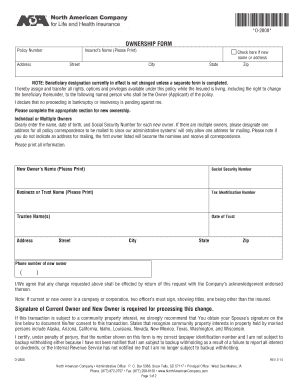
The O-2808 form is essential for individuals or entities looking to change ownership of an insurance policy with the North American Company. This guide provides clear, step-by-step instructions to help users complete the form accurately and efficiently, ensuring all necessary information is included.
Follow the steps to complete the O-2808 form online.
- Press the ‘Get Form’ button to access the O-2808 form and open it for editing.
- Enter the policy number in the designated field to reference the correct policy.
- Provide the insured’s name clearly in the format requested. Indicate if there are any changes to the name or address by checking the corresponding box.
- Complete the address section with the street, city, state, and zip code for the insured.
- Identify whether there will be individual or multiple owners. For each new owner, clearly input their name, date of birth, and Social Security Number. If there are multiple owners, designate a single mailing address for correspondence.
- If the new owner is a business or trust, include the business or trust name, tax identification number, trustee names, and date of trust.
- Fill in the phone number of the new owner in the specified format.
- Ensure proper signatures are included. Both current and new owners must sign the form. If applicable, include signatures from spouses and any required representatives for trusts or businesses.
- Review all information for accuracy and completeness. Save your changes, then download, print, or share the form as needed.
Complete your O-2808 form online today to ensure timely processing.
Since 1886, North American has been helping people protect their loved ones and financial futures.