Loading
Form preview
  • US Legal Forms
  • Form Library
  • More Forms
  • More Multi-State Forms
  • Coss Briefing Checklist

Get Coss Briefing Checklist

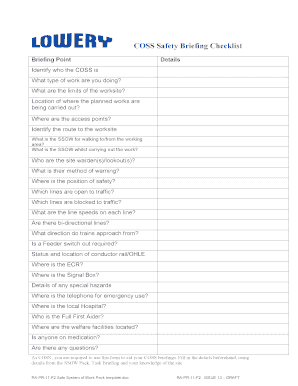
COSS Safety Briefing Checklist Briefing Point Details Identify who the COSS is What type of work are you doing? What are the limits of the worksite? Location of where the planned works are being carried.

How it works

  1. Open form

    Open form follow the instructions

  2. Easily sign form

    Easily sign the form with your finger

  3. Share form

    Send filled & signed form or save

How to fill out the Coss Briefing Checklist online

The Coss Briefing Checklist is an essential tool designed to ensure safety standards are met before commencing work. This guide will provide step-by-step instructions on how to accurately fill out the checklist online, fostering a secure work environment.

Follow the steps to successfully complete the Coss Briefing Checklist.

  1. Press the ‘Get Form’ button to obtain the checklist and open it in your preferred editor.
  2. Begin at the top of the form by identifying who the Coss is and specify the type of work being performed. Make sure to input the details carefully to avoid any confusion.
  3. Fill in the limits of the worksite and specify the exact location where the planned works are taking place. This information is critical for maintaining safety protocols.
  4. Indicate the access points to the worksite and identify the route to be taken. This helps ensure all workers are aware of safe passages.
  5. Detail the safe systems of work (SSOW) for both walking to/from the working area and whilst conducting the work itself.
  6. List the site wardens or lookout individuals along with their methods of warning others about potential hazards.
  7. Document the position of safety, identifying which lines are open and blocked to traffic, along with the operational line speeds.
  8. Specify if there are bi-directional lines and the direction from which trains approach the worksite. Include details regarding feeder switches and the status of conductor rails.
  9. Identify the location of emergency resources such as the telephone for emergency use, the local hospital, and the full first aider.
  10. Complete sections regarding any special hazards, welfare facilities, and whether any staff are on medication.
  11. Upon filling out all necessary fields, review your entries for accuracy.
  12. Once satisfied, you can save changes, download, print, or share the completed form as required.

Take a moment to fill out your Coss Briefing Checklist online to promote a safe and informed work environment.

Get form

Experience a faster way to fill out and sign forms on the web. Access the most extensive library of templates available.
Get form

Related content

Evaluating the Factor Validity of the Children's...
by SJ Molitor · 2017 · Cited by 7 — For example, the Homework Problems Checklist (HPC;...
Learn more
FM 6-0, Commander and Staff Organization and...
May 5, 2014 — Planning considerations for military briefings . ... Liaison...
Learn more
SMART SCALE Technical Guide
Figure 2.2 VTrans Travel Markets (CoSS, RN, and UDA) . ... E.1 - Checklist of project...
Learn more

Related links form

DoL WH-380-E 2020 DoL WH-380-F 2020 Voluntary Request To Relinquish Position With Intent To ... Certificates Of Equivalent Competency - UK Ship Register

Questions & Answers

Get answers to your most pressing questions about US Legal Forms API.

Contact support

Safety briefing The COSS (controller of site safety) will make sure that you have a safe system of work (sometimes called SSOW) so you are not at risk from trains or electrified equipment. The COSS wears a blue badge with 'COSS' on it. A safety briefing will include: where you will work and what you will do.

If you are acting as Lookout, you must wear a white armlet or badge with 'LOOKOUT' in red letters. The COSS will tell you: where to stand who to watch where they will be working the limits of the Safe System of Work.

A position of safety is an area clear of all open lines where you can stand safely until the train has passed or where you should go to when you get warning that a train is approaching. The COSS or Safe Work Leader will tell you where the position of safety is for your worksite, before you start working there.

The COSS will stop the work, move everyone to a position of safety, and then brief everyone on the new safe system of work. Always comply with any briefings or instructions from the COSS, or you could be endangering your or you work mates' lives.

Safety briefing The COSS (controller of site safety) will make sure that you have a safe system of work (sometimes called SSOW) so you are not at risk from trains or electrified equipment. The COSS wears a blue badge with 'COSS' on it. A safety briefing will include: where you will work and what you will do.

The COSS/SWL briefing. A COSS briefing. If you're walking in a group of two or more people on or near the line, you must be accompanied by a controller of site safety, known as a COSS. Their role is to make sure that nobody is put in danger from electrification equipment or from trains.

Safety briefing The COSS (controller of site safety) will make sure that you have a safe system of work (sometimes called SSOW) so you are not at risk from trains or electrified equipment.

A controller of site safety or COSS is a person qualified by the British company Network Rail to ensure safe practice for work occurring on or near rail infrastructure. Their primary role is to set up a safe system of work to protect staff from trains and trains from staff and activities.

A position of safety is an area clear of all open lines where you can stand safely until the train has passed or where you should go to when you get warning that a train is approaching. The COSS or Safe Work Leader will tell you where the position of safety is for your worksite, before you start working there.

The COSS wears a blue badge with 'COSS' on it. A safety briefing will include: where you will work and what you will do. how you will get to the work site.

Get This Form Now!

Use professional pre-built templates to fill in and sign documents online faster. Get access to thousands of forms.
Get form
If you believe that this page should be taken down, please follow our DMCA take down processhere.

Industry-leading security and compliance

US Legal Forms protects your data by complying with industry-specific security standards.
  • In businnes since 1997
    25+ years providing professional legal documents.
  • Accredited business
    Guarantees that a business meets BBB accreditation standards in the US and Canada.
  • Secured by Braintree
    Validated Level 1 PCI DSS compliant payment gateway that accepts most major credit and debit card brands from across the globe.
Get Coss Briefing Checklist
Get form
  • Adoption
  • Bankruptcy
  • Contractors
  • Divorce
  • Home Sales
  • Employment
  • Identity Theft
  • Incorporation
  • Landlord Tenant
  • Living Trust
  • Name Change
  • Personal Planning
  • Small Business
  • Wills & Estates
  • Packages A-Z
  • Affidavits
  • Bankruptcy
  • Bill of Sale
  • Corporate - LLC
  • Divorce
  • Employment
  • Identity Theft
  • Internet Technology
  • Landlord Tenant
  • Living Wills
  • Name Change
  • Power of Attorney
  • Real Estate
  • Small Estates
  • Wills
  • All Forms
  • Forms A-Z
  • Form Library
  • Legal Hub
  • About Us
  • Help Portal
  • Legal Resources
  • Blog
  • Affiliates
  • Contact Us
  • Delete My Account
  • Site Map
  • Industries
  • Forms in Spanish
  • Localized Forms
  • State-specific Forms
  • Forms Kit
  • Real Estate Handbook
  • All Guides
  • Notarize
  • Incorporation services
  • For Consumers
  • For Small Business
  • For Attorneys
  • USLegal
  • FormsPass
  • pdfFiller
  • signNow
  • altaFlow
  • DocHub
  • Instapage
Form Packages
  • Adoption
  • Bankruptcy
  • Contractors
  • Divorce
  • Home Sales
  • Employment
  • Identity Theft
  • Incorporation
  • Landlord Tenant
  • Living Trust
  • Name Change
  • Personal Planning
  • Small Business
  • Wills & Estates
  • Packages A-Z
Form Categories
  • Affidavits
  • Bankruptcy
  • Bill of Sale
  • Corporate - LLC
  • Divorce
  • Employment
  • Identity Theft
  • Internet Technology
  • Landlord Tenant
  • Living Wills
  • Name Change
  • Power of Attorney
  • Real Estate
  • Small Estates
  • Wills
  • All Forms
  • Forms A-Z
  • Form Library
Customer Service
  • Legal Hub
  • About Us
  • Help Portal
  • Legal Resources
  • Blog
  • Affiliates
  • Contact Us
  • Delete My Account
  • Site Map
  • Industries
  • Forms in Spanish
  • Localized Forms
  • State-specific Forms
  • Forms Kit
Legal Guides
  • Real Estate Handbook
  • All Guides
Prepared for you
  • Notarize
  • Incorporation services
Our Customers
  • For Consumers
  • For Small Business
  • For Attorneys
Our Sites
  • USLegal
  • FormsPass
  • pdfFiller
  • signNow
  • altaFlow
  • DocHub
  • Instapage
Social Media
Call us now toll free:
+1 833 426 79 33
As seen in:
© Copyright 1999-2026 airSlate Legal Forms, Inc. 3720 Flowood Dr, Flowood, Mississippi 39232
  • Your Privacy Choices
  • Terms of Service
  • Privacy Notice
  • Content Takedown Policy
  • Bug Bounty Program