Loading
Get Fire Drill Log
How it works
-

Open form follow the instructions
-

Easily sign the form with your finger
-

Send filled & signed form or save
How to fill out the Fire Drill Log online
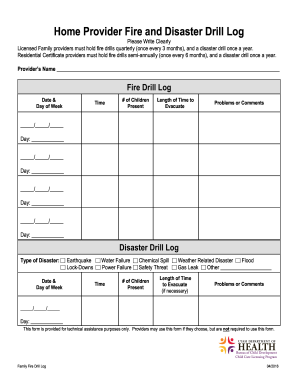
Filling out the Fire Drill Log is an essential task for licensed family and residential certificate providers to ensure safety and compliance. This guide will provide clear instructions on how to complete the log efficiently and accurately.
Follow the steps to fill out the Fire Drill Log online
- Click ‘Get Form’ button to obtain the form and open it in the editor.
- In the 'Provider’s Name' section, enter your full name or the name of your organization as the responsible provider.
- In the Fire Drill Log section, fill in the 'Date & Day of Week' for each fire drill conducted. Ensure each entry is correctly dated.
- Input the 'Time' of the fire drill held on each listed date to track when the drills were conducted.
- Record the '# of Children Present' during each fire drill, ensuring accurate counts for safety assessments.
- Note the 'Length of Time to Evacuate' for each drill, which is crucial for evaluating the efficiency of your emergency response.
- Use the 'Problems or Comments' field to document any issues encountered during the drills or observations for future improvements.
- For the Disaster Drill Log, indicate the 'Type of Disaster' from the provided options and fill in the respective fields similar to the fire drill section.
- After completing all sections of the form, ensure you review your entries for accuracy.
- Finally, save your changes and choose to download, print, or share the form as needed.
Complete your Fire Drill Log online to ensure safety and compliance in your setting.
Select START > Pool Swim. Select your pool size, or enter a custom size. Select START. ... Start your activity. ... Select UP or DOWN to view additional data pages (optional). When resting, select. ... Select. ... After you finish the activity, select STOP > Save.