Loading
Get Crossover Outpatient Facility Claim Type 31
How it works
-

Open form follow the instructions
-

Easily sign the form with your finger
-

Send filled & signed form or save
How to fill out the Crossover Outpatient Facility Claim Type 31 online
This guide provides a clear and supportive overview for completing the Crossover Outpatient Facility Claim Type 31 form online. By following these detailed instructions, users with varying levels of experience can accurately fill out the required information and submit their claims efficiently.
Follow the steps to successfully complete the claim form.
- Click the ‘Get Form’ button to obtain the form and open it in the editor.
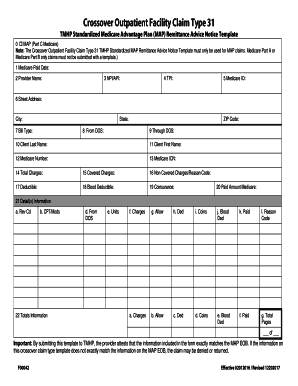
- In field 0, check the box to indicate that the client has a MAP, Part C Medicare. Ensure that this template is only used for MAP claims.
- In field 1, enter the Medicare Paid Date as listed on the MAP Explanation of Benefits (EOB).
- In field 2, input the billing provider’s name.
- In field 3, provide the National Provider Identifier (NPI) or Atypical Provider Identifier (API) for the billing provider.
- In field 4, enter the Texas Provider Identifier (TPI) for the billing provider.
- In field 5, fill in the Medicare Provider ID of the billing provider as indicated on the MAP EOB.
- In field 6, provide the billing provider’s street address, city, state, and ZIP code in their respective fields.
- In field 7, enter the Medicare Bill Type shown on the MAP EOB.
- In fields 8 and 9, list the first and last dates of service (DOS) in MM/DD/YYYY format.
- In field 10 and 11, provide the client’s last and first name as found on the MAP EOB.
- In field 12, enter the patient’s Medicare number.
- In field 13, include the Medicare Internal Control Number (ICN) from the MAP EOB.
- In fields 14 to 20, sequentially input the total charges, covered charges, non-covered charges with reason code, deductible, blood deductible (if applicable), coinsurance, and Medicare paid amount as per the MAP EOB.
- In section 21, provide detailed information for each procedure listed on the MAP EOB, including Rev Code, CPT, modifiers, date of service, units billed, charges, allowed amounts, deductibles, coinsurance, blood deductibles, paid amounts, and reason codes.
- In section 22, summarize the total charges, total allowed amounts, total deductible, total coinsurance, total blood deductible, and total paid as listed on the MAP EOB.
- If necessary, indicate the total number of pages in the claim where there are more than 10 detail line items.
- After filling out all fields, ensure that the information matches the MAP EOB exactly before finalizing the claim.
- Once all entries are complete, save any changes, and proceed to download, print, or share the form as required.
Start your online documents today and ensure timely processing of your claims.
Some people qualify for both Medicare and Medi-Cal and are “dual eligible” or Medi Medi beneficiaries. When an individual has both Medicare Parts A and B, Medicare is the primary insurance and pays for most medical care. Medi-Cal is the secondary insurance.
Industry-leading security and compliance
US Legal Forms protects your data by complying with industry-specific security standards.
-
In businnes since 199725+ years providing professional legal documents.
-
Accredited businessGuarantees that a business meets BBB accreditation standards in the US and Canada.
-
Secured by BraintreeValidated Level 1 PCI DSS compliant payment gateway that accepts most major credit and debit card brands from across the globe.