Loading
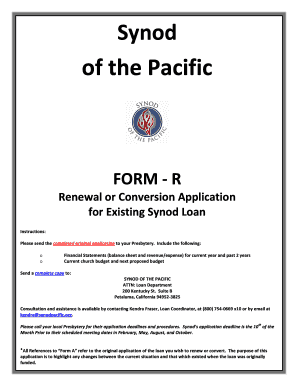
Get Synod Of The Pacific Form R Renewal Or Conversion Application For Existing Synod Loan Instructions
How it works
-

Open form follow the instructions
-

Easily sign the form with your finger
-

Send filled & signed form or save
How to fill out the Synod Of The Pacific FORM R Renewal Or Conversion Application For Existing Synod Loan Instructions online
This guide provides a detailed walkthrough for completing the Synod Of The Pacific FORM R, which is essential for users seeking to renew or convert their existing Synod loans. By following these instructions, users can efficiently complete the form online with confidence and clarity.
Follow the steps to fill out the application accurately and efficiently.
- Click the ‘Get Form’ button to obtain the form and open it in your preferred editor.
- Begin with Section A: General Information. Fill in the current balance of your loan and the amount you are applying for if it differs. Provide the date of the original promissory note and the original use of funds. Ensure to include your church's name, presbytery, contact information, and relevant addresses.
- In Section B: Information about Your Community, input the radius of your community, current population, and expected growth over the next five years. Describe any factors contributing to population changes and economic base adjustments.
- Proceed to Section C: Church Statistical Information. Input the church membership numbers for the past five years, average attendance in Sunday services, and any explanations for changes in membership.
- Complete Section D: Church Financial Information. Detail the estimated values of church assets and provide the operating budget for the current year and previous years. Include information on existing loans and any anticipated new loans.
- Fill out Section E: Mission Giving, including the total general operating revenue and specifics about your mission-giving percentages. This section is vital for determining potential interest rate discounts.
- In Section H: Standard Terms and Conditions, read through each condition and initial next to those you agree to follow. If there are any conditions that cannot be met, clearly request a waiver of those conditions on the designated application area.
- In Sections I: Approvals, ensure all relevant approvals and signatures from your church session, congregation (if applicable), presbytery, and the Synod are completed and dated.
- Finally, review all filled sections for accuracy and completeness. Save your changes, then download, print, or share the form as required.
Get started with your application today by following these steps online.
Get form
Experience a faster way to fill out and sign forms on the web. Access the most extensive library of templates available.
Get This Form Now!
Use professional pre-built templates to fill in and sign documents online faster. Get access to thousands of forms.
Industry-leading security and compliance
US Legal Forms protects your data by complying with industry-specific security standards.
-
In businnes since 199725+ years providing professional legal documents.
-
Accredited businessGuarantees that a business meets BBB accreditation standards in the US and Canada.
-
Secured by BraintreeValidated Level 1 PCI DSS compliant payment gateway that accepts most major credit and debit card brands from across the globe.