Loading
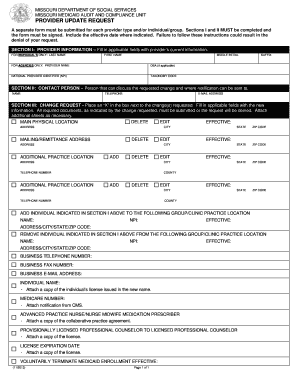
Get Missouri Medicaid Provider Update Request Form
How it works
-

Open form follow the instructions
-

Easily sign the form with your finger
-

Send filled & signed form or save
How to fill out the Missouri Medicaid Provider Update Request Form online
This guide provides a comprehensive overview on how to complete the Missouri Medicaid Provider Update Request Form online, ensuring a smooth and efficient process for users. Follow the steps below to accurately submit your request for provider updates.
Follow the steps to fill out the Missouri Medicaid Provider Update Request Form online effectively.
- Press the ‘Get Form’ button to access the form and open it in your designated document editor.
- In Section I, provide the provider information. If you are an individual, fill in your last name, first name, and middle initial. For agencies, enter the provider name and any doing business as (DBA) name, along with the National Provider Identifier (NPI) and taxonomy code.
- Proceed to Section II, where you will identify a contact person who can discuss the requested changes. Fill in the name, telephone number, and email address of this individual.
- Move to Section III to indicate the type of change request. Place an ‘X’ in the box next to the applicable changes (e.g., delete, edit) and update the information as required. Make sure to include any necessary documentation that supports your request.
- Provide detailed information for each location change, including addresses, cities, states, and effective dates in the respective fields. Attach additional sheets if more space is needed.
- If adding or removing individuals from a group or clinic practice location, input their names, NPIs, addresses, and effective dates accordingly.
- In Section IV, include any comments or additional information that may help clarify your change request. Sign and date the form, indicating your authority to execute the document on behalf of the provider.
- Finally, fax the completed form along with any required attachments to the designated number to complete the request. Make sure you send it to 573/751-5065, attention Clerk.
Complete your Missouri Medicaid Provider Update Request Form online to ensure your provider information is accurate and up to date.
Established to deliver quality healthcare in the state of Missouri through local, regional and community-based resources, Home State is a MO HealthNet Managed Care Organization and a wholly-owned subsidiary of Centene Corporation (Centene).