We use cookies to improve security, personalize the user experience, enhance our marketing activities (including cooperating with our marketing partners) and for other business use.
Click "here" to read our Cookie Policy. By clicking "Accept" you agree to the use of cookies. Read less
Read more
Accept
Loading
Form preview
  • US Legal Forms
  • Form Library
  • Foreign Forms
  • Foreign UK Immigration Forms
  • Uk Vaf1e 2011

Get Uk Vaf1e 2011-2025

E of Issue 2.3 Issuing Authority >>>>>>>>>>>>>>>>>>>>>>>>>>>>>>>> 2.4 Date of Issue D D 2.5 Date of Expiry >>>>>>>>>>>>>>>>>>>>>>>>>>>>>>>>>> D D M M M M Y Y Y Y 2.6 Is this your first passport? Put a cross (x) in the relevant box Yes Y Y Y Y No If ‘Yes’ go to Part 3 2.7 Please give details of any previous passports, covering the last 10 years, including where these passports are now. Part 3 Your Contact Details Read Guidance, Part 3 3.1 Your full residential address and p.

How it works

  1. Open form

    Open form follow the instructions

  2. Easily sign form

    Easily sign the form with your finger

  3. Share form

    Send filled & signed form or save

How to fill out the UK VAF1E online

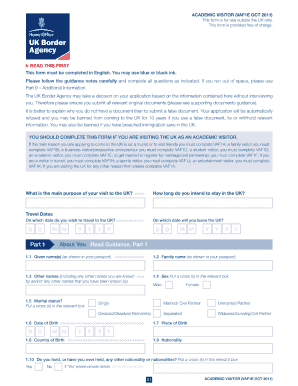
Filling out the UK VAF1E form is an essential step for individuals visiting the UK as academic visitors. This comprehensive guide will walk you through the form's sections and provide clear, step-by-step instructions to assist you in completing your application accurately and efficiently.

Follow the steps to successfully complete your UK VAF1E application online.

  1. To begin, click the ‘Get Form’ button to access the VAF1E application form and open it in the online editor.
  2. Provide details regarding the main purpose of your visit to the UK, ensuring clarity on your intention as an academic visitor.
  3. Indicate the duration of your stay by filling in the travel dates, specifying both your departure date from the UK and your intended arrival date.
  4. In 'About You,' complete all required fields, including your given name(s), family name, sex, marital status, date of birth, place of birth, country of birth, and nationality.
  5. Under 'Passport Information,' enter the relevant details about the passport you will use for travel, including the passport number, place of issue, date of issue, and date of expiry.
  6. In 'Your Contact Details,' provide your full residential address, how long you have lived there, and your home and mobile telephone numbers, as well as your email address.
  7. Complete the 'Your Family' section by providing details about your family members, including your parents and partner, if applicable.
  8. In 'Finances and Employment,' indicate your current employment status, and provide details concerning your income and expenditure relevant to your visit.
  9. Complete the 'Previous Applications and Travel History' section by detailing your past travels and any prior applications made to the UK Home Office.
  10. Provide any additional information in Part 9 if necessary, and in Part 10, read and acknowledge the declaration regarding the accuracy of the information provided.
  11. Finally, review all provided information for accuracy, save your changes, and prepare to download, print, or share the completed form for submission.

Complete your UK VAF1E application online to ensure a successful visa process.

Get form

Experience a faster way to fill out and sign forms on the web. Access the most extensive library of templates available.
Get form

Related content

0001123292-18-000974.txt
... UK!JEU?PPI.;:5TD2=T) *&/8,E7O\7+E(((3X:E?6) ... VAF1E(?;G(*GFO=: M*5RKZ6/...
Learn more
(PDF) G. Ciampoltrini, P. Notini, G. Rossi...
G. Ciampoltrini, P. Notini, G. Rossi, Castelli e domini in Garfagnana fra Due- e Trecento...
Learn more

Related links form

VEHICLE INFORMATION SUMMARY SHEET 2020 Patient Waiver - Vita Physical Therapy Amp Fitness 2020 Gift Letter For Car Washington State 2020 Health Appraisal Questionnaire 2020

Questions & Answers

Get answers to your most pressing questions about US Legal Forms API.

Contact support

To fill out a form for a UK visa, first gather all necessary documents and information required for your specific visa type. Carefully follow the instructions provided on the application form and ensure that every section is completed accurately. Double-check your information before submission, as errors can lead to delays. If you need further assistance, platforms like uslegalforms can provide valuable resources and tips.

To receive Family Link notifications, ensure that notifications are enabled on both your parent device and your child's device. Launch the Family Link app and check the settings for notifications to confirm they are turned on. These notifications will keep you informed about your child’s app usage and screen time. Utilizing tools like the UK VAF1E can further enhance your understanding of digital parenting resources.

Removing Family Link without the parent access code is challenging. The system is designed to prioritize safety and parental control, requiring the code for any changes. If you find yourself locked out, consider reaching out to your parent for assistance. Alternatively, continuing to foster open communication about device usage can be a productive approach.

The success rate of the Global Talent Visa in the UK varies depending on the applicant's qualifications and supporting documents. Generally, applicants with robust endorsements and a clear demonstration of their talent can expect favorable outcomes. Understanding the UK VAF1E can help you navigate the application process more effectively, increasing your chances of success. Ensure you review all submission guidelines carefully.

Yes, you can change your Family Link access code anytime through the Family Link app. Go to your account settings and look for the option to modify the access code. This option provides added security and ensures the appropriate access level for your child's devices. Remember, keeping your settings updated helps maintain a safe digital environment.

To obtain a family linking code, start by opening the Family Link app on your parent device. Then, navigate to your child's account settings, where you’ll find the option to generate a new code. This code is essential for linking new devices, so ensure you provide it carefully. Utilizing the UK VAF1E can also enhance your understanding of the Family Link process.

To unlock an app from Family Link, you need to access the Family Link app on your parent device. Select the child’s account, find the apps section, and choose the app you want to unlock. Then, simply tap on 'Unlock' to remove the restrictions, allowing your child to access the app again. Keep in mind that monitoring app usage remains important for a balanced digital experience.

The term VAF refers to 'Visa Application Form,' which is a crucial component of the UK visa application process. Specifically, the UK VAF1E is a form used by applicants outside the UK to apply for entry clearance. Understanding this terminology helps clarify the steps you need to take when preparing your application for a UK visa.

To find the family linking code for your UK visa, you should log into your online account associated with your UK VAF1E application. This unique code connects family members' applications, ensuring their visas are linked appropriately. If you have difficulty locating it, refer to the documentation provided during your application process, or contact the visa processing center for assistance.

The processing time for a UK visa from America varies but usually takes around 3 weeks. However, this timeframe can change based on individual circumstances and the type of visa you are applying for. For a smoother process, prepare your UK VAF1E application thoroughly to avoid delays. To track your application status, refer to the UK government's official website.

Get This Form Now!

Use professional pre-built templates to fill in and sign documents online faster. Get access to thousands of forms.
Get form
If you believe that this page should be taken down, please follow our DMCA take down processhere.

Industry-leading security and compliance

US Legal Forms protects your data by complying with industry-specific security standards.
  • In businnes since 1997
    25+ years providing professional legal documents.
  • Accredited business
    Guarantees that a business meets BBB accreditation standards in the US and Canada.
  • Secured by Braintree
    Validated Level 1 PCI DSS compliant payment gateway that accepts most major credit and debit card brands from across the globe.
Get UK VAF1E
Get form
Form Packages
Adoption
Bankruptcy
Contractors
Divorce
Home Sales
Employment
Identity Theft
Incorporation
Landlord Tenant
Living Trust
Name Change
Personal Planning
Small Business
Wills & Estates
Packages A-Z
Form Categories
Affidavits
Bankruptcy
Bill of Sale
Corporate - LLC
Divorce
Employment
Identity Theft
Internet Technology
Landlord Tenant
Living Wills
Name Change
Power of Attorney
Real Estate
Small Estates
Wills
All Forms
Forms A-Z
Form Library
Customer Service
Terms of Service
Privacy Notice
Legal Hub
Content Takedown Policy
Bug Bounty Program
About Us
Help Portal
Legal Resources
Blog
Affiliates
Contact Us
Delete My Account
Site Map
Industries
Forms in Spanish
Localized Forms
State-specific Forms
Forms Kit
Legal Guides
Real Estate Handbook
All Guides
Prepared for You
Notarize
Incorporation services
Our Customers
For Consumers
For Small Business
For Attorneys
Our Sites
US Legal Forms
USLegal
FormsPass
pdfFiller
signNow
airSlate WorkFlow
DocHub
Instapage
Social Media
Call us now toll free:
+1 833 426 79 33
As seen in:
  • USA Today logo picture
  • CBC News logo picture
  • LA Times logo picture
  • The Washington Post logo picture
  • AP logo picture
  • Forbes logo picture
© Copyright 1997-2025
airSlate Legal Forms, Inc.
3720 Flowood Dr, Flowood, Mississippi 39232
Form Packages
Adoption
Bankruptcy
Contractors
Divorce
Home Sales
Employment
Identity Theft
Incorporation
Landlord Tenant
Living Trust
Name Change
Personal Planning
Small Business
Wills & Estates
Packages A-Z
Form Categories
Affidavits
Bankruptcy
Bill of Sale
Corporate - LLC
Divorce
Employment
Identity Theft
Internet Technology
Landlord Tenant
Living Wills
Name Change
Power of Attorney
Real Estate
Small Estates
Wills
All Forms
Forms A-Z
Form Library
Customer Service
Terms of Service
Privacy Notice
Legal Hub
Content Takedown Policy
Bug Bounty Program
About Us
Help Portal
Legal Resources
Blog
Affiliates
Contact Us
Delete My Account
Site Map
Industries
Forms in Spanish
Localized Forms
State-specific Forms
Forms Kit
Legal Guides
Real Estate Handbook
All Guides
Prepared for You
Notarize
Incorporation services
Our Customers
For Consumers
For Small Business
For Attorneys
Our Sites
US Legal Forms
USLegal
FormsPass
pdfFiller
signNow
airSlate WorkFlow
DocHub
Instapage
Social Media
Call us now toll free:
+1 833 426 79 33
As seen in:
  • USA Today logo picture
  • CBC News logo picture
  • LA Times logo picture
  • The Washington Post logo picture
  • AP logo picture
  • Forbes logo picture
© Copyright 1997-2025
airSlate Legal Forms, Inc.
3720 Flowood Dr, Flowood, Mississippi 39232