Loading
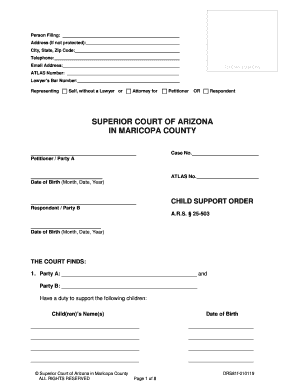
Get Child Support Order A.r.s.25-503, Drs81f. Child Support Order A.r.s.25-503, Drs81f
How it works
-

Open form follow the instructions
-

Easily sign the form with your finger
-

Send filled & signed form or save
How to fill out the CHILD SUPPORT ORDER A.R.S.25-503, DRS81f online
This guide provides comprehensive, step-by-step instructions for filling out the Child Support Order A.R.S. 25-503, DRS81f form online. Designed for clarity and ease of use, it caters to individuals of all legal experience levels.
Follow the steps to complete your form accurately.
- Press the ‘Get Form’ button to obtain the Child Support Order A.R.S.25-503, DRS81f form and open it in your preferred online editing tool.
- Enter the relevant details in the 'Person Filing' section. Include your name, address (if not protected), city, state, zip code, telephone number, and email address.
- For 'Clerk’s Use Only', leave the ATLAS number and lawyer’s bar number blank unless applicable. Specify if you are representing yourself or an attorney if relevant.
- Fill in the case number under the 'SUPERIOR COURT OF ARIZONA IN MARICOPA COUNTY' section. Provide the names of the Petitioner (Party A) and Respondent (Party B), along with their date of birth.
- In the 'THE COURT FINDS' section, list the names and birth dates of the children who are the subject of this order.
- Under 'CHILD SUPPORT GUIDELINES', acknowledge that financial factors and adjustments are set out in the attached Parent’s Worksheet for Child Support Amount.
- Complete the 'CHILD SUPPORT' section by specifying the amount Party A and Party B are ordered to pay, as well as the frequency of payments, based on the Arizona Child Support Guidelines.
- Fill in the 'SUPPORT ARREARS' section if applicable, detailing any child support arrearages owed and the reasons for any deviations from the guidelines.
- If past support is relevant, complete the 'PAST SUPPORT' section, documenting any additional judgments for past support owed.
- Provide information on medical, dental, and vision care responsibilities for the minor children in the corresponding section.
- Include any other decisions regarding travel expenses, information exchange, tax exemptions, and modifications as applicable in the respective sections.
- At the conclusion of the form, ensure that both parties sign and date, reinforcing the accuracy of the information provided.
- Once all sections are accurately filled out, you can save your changes, download the completed form, print it for your records, or share it as necessary.
Start completing your Child Support Order online today!
The CMS might write off arrears if: the person getting maintenance tells the CMS they don't want them to collect the arrears. the person getting maintenance has died. the CMS have told you they've suspended the arrears and won't take action to recover them.
Industry-leading security and compliance
US Legal Forms protects your data by complying with industry-specific security standards.
-
In businnes since 199725+ years providing professional legal documents.
-
Accredited businessGuarantees that a business meets BBB accreditation standards in the US and Canada.
-
Secured by BraintreeValidated Level 1 PCI DSS compliant payment gateway that accepts most major credit and debit card brands from across the globe.