Loading
Get Talktalk My Account
How it works
-

Open form follow the instructions
-

Easily sign the form with your finger
-

Send filled & signed form or save
How to fill out the Talktalk My Account online
Filling out the Talktalk My Account online can streamline your understanding of your billing details and account management. This guide provides clear, step-by-step instructions to help you navigate the process effectively.
Follow the steps to complete your Talktalk My Account form.
- Click ‘Get Form’ button to access the Talktalk My Account form and open it in your editor.
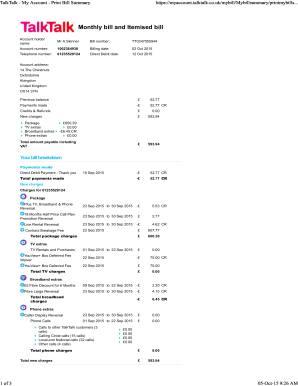
- Begin by entering your account holder name in the corresponding field. Make sure it matches the name associated with your account.
- Input your unique Bill number, which you can find on your previous bills. This ensures you're referencing the correct document.
- Enter your Account number in the designated section. This number is crucial for identifying your account.
- Fill in your Billing date to specify the period the bill covers. This date is typically printed on your bill.
- Provide your Telephone number linked to the account. Ensure accuracy to avoid any service disruptions.
- State your Direct Debit date. This is the date your account is scheduled for the next payment.
- Include your full Account address. Input each component (street, city, postal code) correctly to prevent any miscommunication.
- Review the sections for Previous balance, Payments made, and New charges. This section offers a summary of your account's financial activity.
- Ensure that you check the breakdown of charges for different services (package, TV extras, broadband extras, and phone extras) to have a full understanding of what you are being billed.
- Once you have filled out all the necessary fields and sections, save your changes, and choose whether to download, print, or share the completed form.
Start managing your account online today by completing your Talktalk My Account form.
If you're having trouble logging into My Account, it can be a good idea to: Check your keyboard to make sure caps lock is off. Look through emails from TalkTalk to be sure you're using the right email address to login. Reset your password -- perhaps you or someone in your household has changed it and forgotten.
Industry-leading security and compliance
US Legal Forms protects your data by complying with industry-specific security standards.
-
In businnes since 199725+ years providing professional legal documents.
-
Accredited businessGuarantees that a business meets BBB accreditation standards in the US and Canada.
-
Secured by BraintreeValidated Level 1 PCI DSS compliant payment gateway that accepts most major credit and debit card brands from across the globe.