Loading
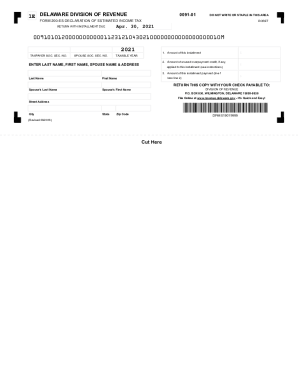
Get De Dor Form 200-es 2018-2026
How it works
-

Open form follow the instructions
-

Easily sign the form with your finger
-

Send filled & signed form or save
How to fill out the DE DoR Form 200-ES online
Filing your estimated income tax can seem daunting, but completing the DE DoR Form 200-ES online simplifies the process. This guide provides you with a clear, step-by-step approach to efficiently fill out the form and ensure accurate submission.
Follow the steps to accurately complete your DE DoR Form 200-ES
- Click ‘Get Form’ button to obtain the form and open it in the editor. This will allow you to access the required fields for completion.
- Enter your taxpayer social security number in the designated field. If applicable, also provide your spouse's social security number.
- Specify the taxable year you are filing for in the provided section. Ensure this matches your financial records.
- Complete line 1 by entering the amount of your installment for the taxable year. Be precise to avoid any delays in processing.
- If you have any unused overpayment credit, enter this amount in line 2. Refer to the instructions if you're unsure whether you qualify for this credit.
- To calculate the amount of your installment payment, subtract the amount on line 2 from the amount on line 1. Enter this final amount in line 3.
- Provide your last name, first name, spouse's last name, spouse's first name, and your current address, including city, state, and zip code, in the appropriate fields.
- Once you have reviewed all information for accuracy, you can save the changes, download the form, print it, or share it as needed for your records.
Complete your DE DoR Form 200-ES online today for a quick and easy filing experience.
Related links form
Yes, tax refund delays are common. The IRS is required by federal law to withhold tax refunds for taxpayers who claim Earned Income Tax Credits and Additional Child Tax Credit until at least Feb. 15, 2023. Keep in mind that receiving your refund can still take a week after the IRS releases it.