Loading
Form preview
  • US Legal Forms
  • Other Templates
  • Foreign Forms
  • Foreign Canada Other Forms
  • Canada Heritage Educational Assistance Payment Application 2016

Get Canada Heritage Educational Assistance Payment Application 2016-2026

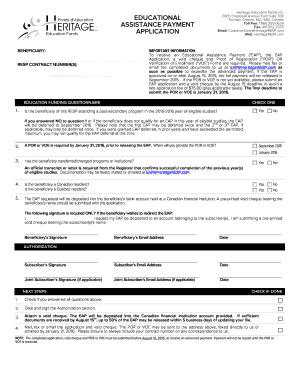
_____________________ Date AUTHORIZATION NEXT STEPS CHECK IF DONE 1. Check if you answered all questions above. 2. Date and sign the Authorization section. 3. Attach a void cheque. The EAP will be deposited into the Canadian financial institution account provided. If sufficient documents are received by August 15th, up to 50% of the EAP may be released within 5 business days of updating your file. 4. Mail, fax or email the application and void cheque. The POR or VOE may be sent to the.

How it works

  1. Open form

    Open form follow the instructions

  2. Easily sign form

    Easily sign the form with your finger

  3. Share form

    Send filled & signed form or save

How to fill out the Canada Heritage Educational Assistance Payment Application online

This guide provides detailed instructions on how to complete the Canada Heritage Educational Assistance Payment Application online. The process is straightforward and aims to assist users in accurately submitting their applications for educational assistance payments.

Follow the steps to successfully complete your application.

  1. Press the ‘Get Form’ button to access the Canada Heritage Educational Assistance Payment Application. This will open the form in your preferred online platform.
  2. Fill in the RESP contract number(s) at the top of the application. This ensures that your application is linked to the correct account.
  3. Respond to the education funding questionnaire, starting with whether the beneficiary is attending a post-secondary program in the 2015-2016 year. Select 'Yes' or 'No' accordingly.
  4. Indicate when you will provide the Proof of Registration (POR) or Verification of Enrollment (VOE). Choose from September 2015 or January 2016 options.
  5. Answer whether the beneficiary has transferred or changed programs or institutions. If 'Yes,' ensure to have an official transcript or letter from the Registrar.
  6. Confirm the residency status of the beneficiary, including Canadian and Quebec residency.
  7. Provide a pre-printed void cheque bearing the beneficiary’s name for direct deposit into their bank account held at a Canadian financial institution.
  8. If applicable, include a signature if the beneficiary wishes to redirect the EAP to the subscriber’s account along with their email address.
  9. Complete the Authorization section by dating and signing the form.
  10. Attach the void cheque, ensuring all necessary documents are included for processing.
  11. Submit your application, including the completed EAP application, void cheque, and POR or VOE, through mail, fax, or email as indicated in the instructions.

Start your application process online today to ensure you meet deadlines and receive your Educational Assistance Payment.

Get form

Experience a faster way to fill out and sign forms on the web. Access the most extensive library of templates available.
Get form

Related content

Indian Education Professional Development (PD)
May 13, 2025 — The Indian Education Professional Development (PD) program aims to...
Learn more
Paying for my Education
The Seminary Fee Schedule outlines current fees associated with your studies at the...
Learn more
Canada - Education and Early Childhood Learning
This is a transitional learning experience that reviews Canadian geography, the history of...
Learn more

Related links form

Read Write Inc Rhymes Suicide Status Form Pdf 2020 Ucpagov Il Form 45

Questions & Answers

Get answers to your most pressing questions about US Legal Forms API.

Contact support

The maximum amount for the Canada Education Savings Grant (CESG) is 20% on the first $2,500 contributed to an RESP each year, up to a lifetime limit of $7,200. This grant can significantly enhance your savings for education. To make the most of your educational funding options, including the Canada Heritage Educational Assistance Payment Application, stay informed about available grants and contributions.

In Canada, education funding comes from various sources including federal and provincial governments, educational institutions, and private entities. Students may also contribute through personal funds or loans. To navigate the options available to you, the Canada Heritage Educational Assistance Payment Application can serve as a vital resource for securing financial assistance for your educational journey.

The Celebrate Canada Funding Program is an initiative designed to support community events celebrating Canadian heritage. This program encourages local celebrations that promote Canada's diverse culture and history. If you are organizing an event, consider how the Canada Heritage Educational Assistance Payment Application can help you utilize available funding effectively.

The educational assistance payment in Canada is a financial contribution aimed at helping students manage educational expenses. This funding may vary based on the individual's circumstances and the specific program applied for. Utilizing the Canada Heritage Educational Assistance Payment Application can guide you through securing the financial support you need for your education.

The education assistance payment in Canada typically refers to financial support from various programs to help individuals cover educational costs. This support can come from government programs or private organizations. Applying for the Canada Heritage Educational Assistance Payment Application can help you access funds designed to assist in your education pursuits.

Educational assistance income refers to funds received for educational purposes, such as scholarships or grants. These payments may support tuition fees, books, and other educational expenses. When applying for the Canada Heritage Educational Assistance Payment Application, it's important to understand how these funds may affect your overall income and tax situation.

To report RESP on your tax return in Canada, include any educational assistance payments received during the tax year as income. It’s important to separate this income from your regular earnings to ensure proper reporting. If you need assistance with the Canada Heritage Educational Assistance Payment Application, uslegalforms can provide resources to help navigate your tax obligations.

Yes, you can use your RESP funds for education outside Canada. However, specific rules apply, so it’s essential to check with your financial institution or tax advisor. When you navigate the Canada Heritage Educational Assistance Payment Application, you can find guidance on how to properly use your RESP funds internationally.

The Canadian equivalent of a 529 plan is the Registered Education Savings Plan (RESP). Like the 529, an RESP offers tax-deferred growth on savings for educational expenses. Utilizing the Canada Heritage Educational Assistance Payment Application can help you manage and apply for these funds seamlessly, ensuring your child has access to necessary educational resources.

The museum assistance program is designed to provide financial support to Canadian museums and related institutions to enhance their operations. It includes funding for various projects aimed at preserving cultural heritage. This program can be an asset for those engaged with the Canada Heritage Educational Assistance Payment Application, as it fosters educational initiatives.

Get This Form Now!

Use professional pre-built templates to fill in and sign documents online faster. Get access to thousands of forms.
Get form
If you believe that this page should be taken down, please follow our DMCA take down processhere.
Get Canada Heritage Educational Assistance Payment Application
Get form
  • Adoption
  • Bankruptcy
  • Contractors
  • Divorce
  • Home Sales
  • Employment
  • Identity Theft
  • Incorporation
  • Landlord Tenant
  • Living Trust
  • Name Change
  • Personal Planning
  • Small Business
  • Wills & Estates
  • Packages A-Z
  • Affidavits
  • Bankruptcy
  • Bill of Sale
  • Corporate - LLC
  • Divorce
  • Employment
  • Identity Theft
  • Internet Technology
  • Landlord Tenant
  • Living Wills
  • Name Change
  • Power of Attorney
  • Real Estate
  • Small Estates
  • Wills
  • All Forms
  • Forms A-Z
  • Other Templates
  • Legal Hub
  • About Us
  • Help Portal
  • Legal Resources
  • Blog
  • Affiliates
  • Contact Us
  • Delete My Account
  • Site Map
  • Industries
  • Forms in Spanish
  • Localized Forms
  • State-specific Forms
  • Forms Kit
  • Real Estate Handbook
  • All Guides
  • Notarize
  • Incorporation services
  • For Consumers
  • For Small Business
  • For Attorneys
  • USLegal
  • FormsPass
  • pdfFiller
  • signNow
  • altaFlow
  • DocHub
  • Instapage
Form Packages
  • Adoption
  • Bankruptcy
  • Contractors
  • Divorce
  • Home Sales
  • Employment
  • Identity Theft
  • Incorporation
  • Landlord Tenant
  • Living Trust
  • Name Change
  • Personal Planning
  • Small Business
  • Wills & Estates
  • Packages A-Z
Form Categories
  • Affidavits
  • Bankruptcy
  • Bill of Sale
  • Corporate - LLC
  • Divorce
  • Employment
  • Identity Theft
  • Internet Technology
  • Landlord Tenant
  • Living Wills
  • Name Change
  • Power of Attorney
  • Real Estate
  • Small Estates
  • Wills
  • All Forms
  • Forms A-Z
  • Other Templates
Customer Service
  • Legal Hub
  • About Us
  • Help Portal
  • Legal Resources
  • Blog
  • Affiliates
  • Contact Us
  • Delete My Account
  • Site Map
  • Industries
  • Forms in Spanish
  • Localized Forms
  • State-specific Forms
  • Forms Kit
Legal Guides
  • Real Estate Handbook
  • All Guides
Prepared for you
  • Notarize
  • Incorporation services
Our Customers
  • For Consumers
  • For Small Business
  • For Attorneys
Our Sites
  • USLegal
  • FormsPass
  • pdfFiller
  • signNow
  • altaFlow
  • DocHub
  • Instapage
Social Media
Call us now toll free:
+1 833 426 79 33
As seen in:
© Copyright 1999-2026 airSlate Legal Forms, Inc. 17 Station Street, Suite 303, Brookline, MA 02445
  • Your Privacy Choices
  • Terms of Service
  • Privacy Notice
  • Content Takedown Policy
  • Bug Bounty Program