Loading
Form preview
  • US Legal Forms
  • Form Library
  • More Forms
  • More Multi-State Forms
  • Fuji Repair Form

Get Fuji Repair Form

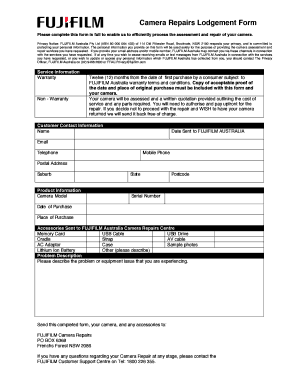
Camera Repairs Lodgement Form Please complete this form in full to enable us to efficiently process the assessment and repair of your camera. Privacy Notice: FUJIFILM Australia Pty Ltd (ABN 80 000.

How it works

  1. Open form

    Open form follow the instructions

  2. Easily sign form

    Easily sign the form with your finger

  3. Share form

    Send filled & signed form or save

How to fill out the Fuji Repair Form online

Filling out the Fuji Repair Form online is a straightforward process that helps ensure your camera repair is handled efficiently. This guide provides clear instructions for each section of the form, making it accessible for all users.

Follow the steps to complete the Fuji Repair Form online

  1. Click the ‘Get Form’ button to obtain the form and open it in the editor.
  2. In the 'Service Information' section, select whether your camera is under warranty or non-warranty. If applicable, provide a copy of the proof of purchase alongside your camera.
  3. Next, fill out the 'Customer Contact Information' section. Include your name, date sent to FUJIFILM Australia, email, telephone number, mobile phone, and postal address.
  4. Proceed to the 'Product Information' section. Here, you will enter the camera model, serial number, date of purchase, place of purchase, and include any accessories you are sending, like a USB cable or battery.
  5. In the 'Problem Description' section, clearly describe the issue you are experiencing with your camera.
  6. Once you have completed the form, review all the entered information for accuracy. After confirming the information, you can save the changes, download the form, print it, or share it as needed.

Complete your Fuji Repair Form online today to start the repair process.

Get form

Experience a faster way to fill out and sign forms on the web. Access the most extensive library of templates available.
Get form

Related content

Fuji Photo Film Co. v. Jazz Photo Corp....
Oct 21, 2014 — Whether it is a permissible "repair" of a patented invention to refurbish...
Learn more
Fuji Electric PXZ Temperature Controller ......
1. Never attempt to disassemble, modify, or repair this unit. Tampering with the unit may...
Learn more
FINEPIX J250/J210 Owner's Manual - Fujifilm X
Movie recording may be interrupted with some types of memory card. • The data in...
Learn more

Related links form

Car Undertaking Delivery Note Food Likes And Dislikes Questionnaire Beetel M59 User Manual Pdf Trojan Power Gym 1 0 Exercises Pdf

Questions & Answers

Get answers to your most pressing questions about US Legal Forms API.

Contact support

PHONE. 1-800-800-3854. Option #1 (Help Desk) Option #2 (Camera Repair) FAX. 1-732-857-3471. WRITE TO US. FUJIFILM North America. Corporation. 1100 King Georges Post Road. Edison, NJ 08837.

In the packaging please include: A copy of a dated proof of purchase (Limited one year warranty on all Fujifilm digital cameras from date of purchase) A note with a brief description of problem or service requested along with your contact information including a telephone number, shipping address and email address.

PHONE. 1-800-800-3854. Option #1 (Help Desk) Option #2 (Camera Repair) FAX. 1-732-857-3471. WRITE TO US. FUJIFILM North America. Corporation. 1100 King Georges Post Road. Edison, NJ 08837.

For service and support, please call 1-800-461-0416.

Downloading pictures requires a Wi-Fi connection. Enable Wi-Fi on the smartphone or tablet....If the camera supports Bluetooth, connect once the Bluetooth icon is active and the names of the camera and the smartphone or tablet are displayed. Tap Import image. Tap Join. Download pictures (downloading pictures).

Fujifilm Customer Care Should you have a non-technical question, please contact our Customer Care Associates at (800) 385-4666 Monday through Friday, from 8:30am and 5:30pm EST.

There is dirt on the memory card contacts: Clean the contacts with a soft, dry cloth. The memory card is damaged: Insert a new memory card. The battery is exhausted: Charge the battery or insert a fully-charged spare battery. The camera has turned off automatically: Turn the camera on.

If your product is under warranty, FUJIFILM will repair and/or replace (with a unit of like condition which may be recertified), a defective Product that is returned, postpaid and insured, by the original en user purchaser, within the Warranty Period to an authorized FUJIFILM Repair Center.

Get This Form Now!

Use professional pre-built templates to fill in and sign documents online faster. Get access to thousands of forms.
Get form
If you believe that this page should be taken down, please follow our DMCA take down processhere.

Industry-leading security and compliance

US Legal Forms protects your data by complying with industry-specific security standards.
  • In businnes since 1997
    25+ years providing professional legal documents.
  • Accredited business
    Guarantees that a business meets BBB accreditation standards in the US and Canada.
  • Secured by Braintree
    Validated Level 1 PCI DSS compliant payment gateway that accepts most major credit and debit card brands from across the globe.
Get Fuji Repair Form
Get form
  • Adoption
  • Bankruptcy
  • Contractors
  • Divorce
  • Home Sales
  • Employment
  • Identity Theft
  • Incorporation
  • Landlord Tenant
  • Living Trust
  • Name Change
  • Personal Planning
  • Small Business
  • Wills & Estates
  • Packages A-Z
  • Affidavits
  • Bankruptcy
  • Bill of Sale
  • Corporate - LLC
  • Divorce
  • Employment
  • Identity Theft
  • Internet Technology
  • Landlord Tenant
  • Living Wills
  • Name Change
  • Power of Attorney
  • Real Estate
  • Small Estates
  • Wills
  • All Forms
  • Forms A-Z
  • Form Library
  • Legal Hub
  • About Us
  • Help Portal
  • Legal Resources
  • Blog
  • Affiliates
  • Contact Us
  • Delete My Account
  • Site Map
  • Industries
  • Forms in Spanish
  • Localized Forms
  • State-specific Forms
  • Forms Kit
  • Real Estate Handbook
  • All Guides
  • Notarize
  • Incorporation services
  • For Consumers
  • For Small Business
  • For Attorneys
  • USLegal
  • FormsPass
  • pdfFiller
  • signNow
  • altaFlow
  • DocHub
  • Instapage
Form Packages
  • Adoption
  • Bankruptcy
  • Contractors
  • Divorce
  • Home Sales
  • Employment
  • Identity Theft
  • Incorporation
  • Landlord Tenant
  • Living Trust
  • Name Change
  • Personal Planning
  • Small Business
  • Wills & Estates
  • Packages A-Z
Form Categories
  • Affidavits
  • Bankruptcy
  • Bill of Sale
  • Corporate - LLC
  • Divorce
  • Employment
  • Identity Theft
  • Internet Technology
  • Landlord Tenant
  • Living Wills
  • Name Change
  • Power of Attorney
  • Real Estate
  • Small Estates
  • Wills
  • All Forms
  • Forms A-Z
  • Form Library
Customer Service
  • Legal Hub
  • About Us
  • Help Portal
  • Legal Resources
  • Blog
  • Affiliates
  • Contact Us
  • Delete My Account
  • Site Map
  • Industries
  • Forms in Spanish
  • Localized Forms
  • State-specific Forms
  • Forms Kit
Legal Guides
  • Real Estate Handbook
  • All Guides
Prepared for you
  • Notarize
  • Incorporation services
Our Customers
  • For Consumers
  • For Small Business
  • For Attorneys
Our Sites
  • USLegal
  • FormsPass
  • pdfFiller
  • signNow
  • altaFlow
  • DocHub
  • Instapage
Social Media
Call us now toll free:
+1 833 426 79 33
As seen in:
© Copyright 1999-2026 airSlate Legal Forms, Inc. 3720 Flowood Dr, Flowood, Mississippi 39232
  • Your Privacy Choices
  • Terms of Service
  • Privacy Notice
  • Content Takedown Policy
  • Bug Bounty Program