Loading
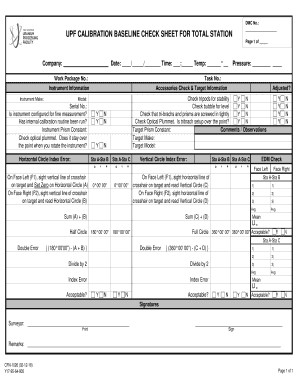
Get Upf Calibration Baseline Check Sheet For Total Station
How it works
-

Open form follow the instructions
-

Easily sign the form with your finger
-

Send filled & signed form or save
How to fill out the UPF CALIBRATION BASELINE CHECK SHEET FOR TOTAL STATION online
The UPF Calibration Baseline Check Sheet for Total Station is an essential document for ensuring the accuracy and functionality of your surveying equipment. This guide provides step-by-step instructions for completing the form online effectively.
Follow the steps to complete the calibration check sheet online.
- Press the ‘Get Form’ button to access the UPF Calibration Baseline Check Sheet for Total Station and open it in your preferred online editor.
- Begin by entering the DMC number at the top of the form. This helps in tracking your document effectively.
- Fill in the company name, date, time, and temperature in the designated fields. Accurate details are essential for record-keeping.
- Specify the work package number and task number. This information provides context for the calibration check being performed.
- In the ‘Instrument Information’ section, enter the make of the instrument. This identifies the specific device being calibrated.
- Proceed to the ‘Accessories Check & Target Information.’ For each accessory check, indicate 'Y' for yes or 'N' for no as appropriate.
- Record the measurements taken on Face Left and Face Right using the crosshair lines. Ensure to set zero correctly on the horizontal circle in both cases.
- Document the vertical circle index error accurately. This is crucial for determining instrument efficiency.
- Complete the EDM check for both measurements between Sta A-Sta B and Sta A-Sta C. Indicate whether the checks are acceptable.
- Check tripod stability, bubble level, and that tri-brachs and prisms are secure. Indicate the status with 'Y' or 'N'.
- Finalize by adding the horizontal circle index error and adjusting as necessary. Mark if it is acceptable.
- In the ‘Signatures’ section, the surveyor should print and sign their name, verifying the accuracy of the document.
- Finally, review your entries for accuracy. Once satisfied, save changes, download, print, or share the completed form.
Begin filling out your UPF Calibration Baseline Check Sheet for Total Station online today to ensure the accuracy of your surveying instruments.
Related links form
Application For Federal Domestic Assistance - Short Organizational 2017
Application For Federal Domestic Assistance - Short Organizational 2019
Iowa Valley Community College District High School Student Application/Registration Form 2017
Bellingham Technical College High School Diploma Application 2016