Loading
Get State Form 52441
How it works
-

Open form follow the instructions
-

Easily sign the form with your finger
-

Send filled & signed form or save
How to fill out the State Form 52441 online
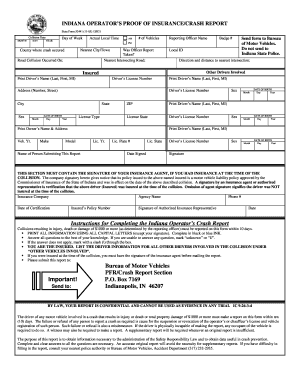
State Form 52441 is essential for reporting collisions resulting in injury, death, or property damage. This guide will assist you in navigating the online completion of the form, ensuring you understand each section and field.
Follow the steps to successfully complete your form online.
- Click ‘Get Form’ button to access the form and open it in the editor.
- Begin by entering the collision date, including the month, day, and year. Make sure to accurately specify the day of the week and the actual local time of the incident.
- Select the number of vehicles involved and provide the name and badge number of the reporting officer, if applicable. Specify the nearest city or town and the intersecting road.
- Fill out the county where the crash occurred and the road on which the collision took place. Include any local identification that may be necessary.
- Provide detailed information about the other drivers involved, including their names printed in the format of last name, first name, and middle initial. Enter their driver’s license number and address.
- Document each driver's sex, date of birth, license type, and state where the license was issued. Repeat this step for all other drivers involved in the crash.
- Enter the vehicle details such as year, make, model, license number, and the state of registration for your vehicle.
- State the name of the person submitting the report and ensure to include their signature. The form must be signed by the insured's insurance agent if insurance was in effect at the time of collision.
- Provide the insurance company name, agency name, phone number, and the policy number. Ensure an authorized insurance representative signs and dates the certification.
- Review all entries for accuracy and completeness. If everything is correct, save your changes, download, print, or share the completed form as necessary.
Complete and submit your State Form 52441 online today for an efficient processing.
Logging into your myBMV account, Calling 888-692-6841 using the access code found on your notice, Via mail using the reinstatement coupon in the Reinstatement notice, or. Visiting one of our self-service BMV Connect kiosks.