Loading
Get Church Visitor Card Template Doc
How it works
-

Open form follow the instructions
-

Easily sign the form with your finger
-

Send filled & signed form or save
How to fill out the Church Visitor Card Template Doc online
Completing the Church Visitor Card Template Doc online is a straightforward process that helps your church connect with visitors. This guide provides step-by-step instructions to ensure you accurately fill out the form and provide the necessary information.
Follow the steps to fill out the Church Visitor Card Template form online.
- Click ‘Get Form’ button to obtain the form and open it in the editor.
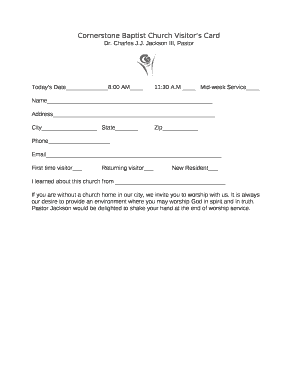
- Fill in today’s date by selecting or entering the appropriate date. Indicate your service time preference by selecting either '8:00 AM' or '11:30 A.M' or mark 'Mid-week Service' if applicable.
- Provide your name in the designated field. Ensure that you write your full name to help the church staff address you correctly.
- Enter your address, including the street, city, and state. This helps the church know more about your location and send out community information if needed.
- Fill in the zip code in the designated field to complete your address information.
- Provide your phone number. This will allow the church to contact you for follow-ups or information about services and events.
- Enter your email address in the corresponding field. This is important for communication and updates regarding church activities.
- Select the appropriate checkboxes to indicate your visitor status: 'First time visitor,' 'Returning visitor,' or 'New Resident.' This information helps the church tailor their welcome approach.
- In the final field, share how you learned about the church. This can include friends, social media, flyers, or other sources.
- Review all information for accuracy. Once confirmed, you can save any changes made, download the filled form, print it out, or share it through the designated options within the editor.
Complete your Church Visitor Card Template Doc online today to connect with our community!
Click on “Go to Google Forms” in the personal tab. Click on the big “+” to start a new, blank form. Give your form a new name where the placeholder says “Untitled Form.” You can change it to “Connect Card for [INSERT YOUR CHURCH NAME].” Under “Form Description,” write “Thank you for joining us!