Loading
Form preview
  • US Legal Forms
  • Form Library
  • More Forms
  • More Multi-State Forms
  • Rle Format - Vivacollege

Get Rle Format - Vivacollege

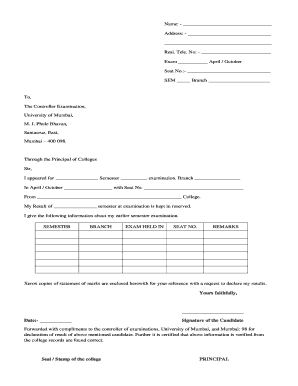
Name: Address: Resi. Tele. No: Exam April / October Seat No.: SEM Branch To, The Controller Examination, University of Mumbai, M. J. Phule Bhavan, Santacruz, East, Mumbai 400 098. Through the Principal.

How it works

  1. Open form

    Open form follow the instructions

  2. Easily sign form

    Easily sign the form with your finger

  3. Share form

    Send filled & signed form or save

How to fill out the RLE Format - Vivacollege online

Filling out the RLE Format - Vivacollege is a straightforward process that requires careful attention to detail. This guide will help you navigate each section of the form, ensuring accuracy and completeness as you submit your results inquiry.

Follow the steps to complete the RLE Format - Vivacollege.

  1. Click the ‘Get Form’ button to obtain the form and open it in the editor.
  2. In the first section, fill in your name by entering it clearly in the designated space provided under 'Name.' Ensure that you spell your name correctly as it appears on official documents.
  3. Next, enter your address in the lines provided. Without abbreviation, include your street address, city, state, and zip code.
  4. Input your residential telephone number in the 'Resi. Tele. No:' section. This should be a number where you can be reached easily.
  5. Indicate the examination month by marking either April or October in the corresponding section. Be sure this matches the semester you are inquiring about.
  6. Enter your seat number in the 'Seat No.' field. Check your examination details to ensure this information is accurate.
  7. Specify the semester number in the 'SEM' section and your branch name in the 'Branch' field. These should accurately reflect your current enrollment details.
  8. In the body of the letter addressed to the Controller Examination, state the examination you appeared for, including the semester and branch. Fill in your details appropriately.
  9. Mention the specific examination date in the section provided, ensuring it corresponds with your records.
  10. Conclude the letter with your signature and date. Make sure to verify that everything is completed before submission.
  11. Finally, save your changes to the document. You may download, print, or share the completed form as required.

Start filling out the RLE Format - Vivacollege online today to ensure your results inquiry is processed smoothly.

Get form

Experience a faster way to fill out and sign forms on the web. Access the most extensive library of templates available.
Get form

Related content

Examination - Ruparel College
Student Information Form for SY and TY (ACADEMIC YEAR 2021-2022) ; Results of Semester III...
Learn more

Related links form

HSBC Online Certificate Of Deposit 2019 CAPS Payroll Direct Deposit Request 2018 Toyota Financial Service 7300 HSBC Online Certificate Of Deposit 2022

Questions & Answers

Get answers to your most pressing questions about US Legal Forms API.

Contact support

Understanding run-length encoding RLE, for short, is a simple morse-like representation of shapes in 2d images. In this case, what's encoded are some rectangular shapes - the bounding boxes - where the ships are located in the respective images.

RLE is run-length encoding. It is used to encode the location of foreground objects in segmentation. Instead of outputting a mask image, you give a list of start pixels and how many pixels after each of those starts is included in the mask.

Run-length encoding (RLE) is a form of lossless data compression in which runs of data (sequences in which the same data value occurs in many consecutive data elements) are stored as a single data value and count, rather than as the original run.

Run-length encoding (RLE) is a type of data compression technique. It compresses data with repeating patterns, such as text or images with solid background areas. Hitachi initially patented this method in 1983, and it would become a standard solution for image compression until more recent techniques.

RLE is a very simple form of data compression in which runs of data are stored as a single data value and its count, rather than as the original run. This is most useful for data that contain many such runs, for example, relatively simple graphic images such as icons, line drawings, and animations.

Run-length encoding (RLE) is a form of lossless data compression in which runs of data (sequences in which the same data value occurs in many consecutive data elements) are stored as a single data value and count, rather than as the original run.

Run-length encoding (RLE) is a form of lossless compression. RLE is a simple method of compressing data by specifying the number of times a character or pixel colour repeats followed by the value of the character or pixel. The aim is to reduce the number of bits used to represent a set of data.

Practical Run Length Encoding Examples Consequently, a binary number like '00001111000', can be compressed using RLE into two distinct binary numbers representing lengths of 0s and 1s respectively. Thus, '00001111000' is encoded to '443', implying four 0s, followed by three 1s, followed by two 0s.

Get This Form Now!

Use professional pre-built templates to fill in and sign documents online faster. Get access to thousands of forms.
Get form
If you believe that this page should be taken down, please follow our DMCA take down processhere.
Get RLE Format - Vivacollege
Get form
  • Adoption
  • Bankruptcy
  • Contractors
  • Divorce
  • Home Sales
  • Employment
  • Identity Theft
  • Incorporation
  • Landlord Tenant
  • Living Trust
  • Name Change
  • Personal Planning
  • Small Business
  • Wills & Estates
  • Packages A-Z
  • Affidavits
  • Bankruptcy
  • Bill of Sale
  • Corporate - LLC
  • Divorce
  • Employment
  • Identity Theft
  • Internet Technology
  • Landlord Tenant
  • Living Wills
  • Name Change
  • Power of Attorney
  • Real Estate
  • Small Estates
  • Wills
  • All Forms
  • Forms A-Z
  • Form Library
  • Legal Hub
  • About Us
  • Help Portal
  • Legal Resources
  • Blog
  • Affiliates
  • Contact Us
  • Delete My Account
  • Site Map
  • Industries
  • Forms in Spanish
  • Localized Forms
  • State-specific Forms
  • Forms Kit
  • Real Estate Handbook
  • All Guides
  • Notarize
  • Incorporation services
  • For Consumers
  • For Small Business
  • For Attorneys
  • USLegal
  • FormsPass
  • pdfFiller
  • signNow
  • altaFlow
  • DocHub
  • Instapage
Form Packages
  • Adoption
  • Bankruptcy
  • Contractors
  • Divorce
  • Home Sales
  • Employment
  • Identity Theft
  • Incorporation
  • Landlord Tenant
  • Living Trust
  • Name Change
  • Personal Planning
  • Small Business
  • Wills & Estates
  • Packages A-Z
Form Categories
  • Affidavits
  • Bankruptcy
  • Bill of Sale
  • Corporate - LLC
  • Divorce
  • Employment
  • Identity Theft
  • Internet Technology
  • Landlord Tenant
  • Living Wills
  • Name Change
  • Power of Attorney
  • Real Estate
  • Small Estates
  • Wills
  • All Forms
  • Forms A-Z
  • Form Library
Customer Service
  • Legal Hub
  • About Us
  • Help Portal
  • Legal Resources
  • Blog
  • Affiliates
  • Contact Us
  • Delete My Account
  • Site Map
  • Industries
  • Forms in Spanish
  • Localized Forms
  • State-specific Forms
  • Forms Kit
Legal Guides
  • Real Estate Handbook
  • All Guides
Prepared for you
  • Notarize
  • Incorporation services
Our Customers
  • For Consumers
  • For Small Business
  • For Attorneys
Our Sites
  • USLegal
  • FormsPass
  • pdfFiller
  • signNow
  • altaFlow
  • DocHub
  • Instapage
Social Media
Call us now toll free:
+1 833 426 79 33
As seen in:
© Copyright 1999-2026 airSlate Legal Forms, Inc. 17 Station Street, Suite 303, Brookline, MA 02445
  • Your Privacy Choices
  • Terms of Service
  • Privacy Notice
  • Content Takedown Policy
  • Bug Bounty Program