Loading
Get School Secretary/receptionist/clerk Evaluation
How it works
-

Open form follow the instructions
-

Easily sign the form with your finger
-

Send filled & signed form or save
How to fill out the School Secretary/Receptionist/Clerk Evaluation online
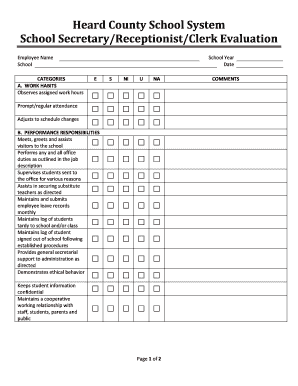
Completing the School Secretary/Receptionist/Clerk Evaluation online is a straightforward process that ensures efficient evaluation of staff performance. This guide provides clear and detailed instructions for users to accurately fill out the evaluation form, making the process seamless and understandable.
Follow the steps to successfully complete your evaluation form.
- Press the ‘Get Form’ button to access the evaluation form and open it in your preferred online document editor.
- Begin by entering the employee's name and the school they are associated with in the designated fields at the top of the form.
- For section A, 'Work Habits', evaluate the employee's attendance and adaptability to schedule changes by selecting one of the provided ratings: E for Excellent, S for Satisfactory, NI for Needs Improvement, U for Unsatisfactory, or NA for Not Applicable.
- Proceed to section B, 'Performance Responsibilities'. Assess each listed responsibility by selecting the appropriate rating based on the employee's performance in tasks such as greeting visitors, maintaining logs, and securing substitutes.
- In section C, 'Training and Experience', indicate whether the employee participates in relevant training by selecting the appropriate rating.
- Move on to section D, 'Personal Qualities'. Evaluate attributes like attitude towards work, responsibility acceptance, and receptiveness to feedback by choosing the corresponding rating.
- If there are additional responsibilities at the school level for the employee, detail these in the provided space under 'Additional School Level Responsibilities'.
- For the overall evaluation, select the final rating that encapsulates the employee’s performance based on the assessments from the previous sections.
- Finally, sign the evaluation form, including spaces for the primary evaluator’s signature, principal’s signature, and employee’s signature. Optionally, check the box if the employee has attached comments.
- Once all sections are completed, save your changes, and choose to download, print, or share the evaluation form as necessary.
Start completing your School Secretary/Receptionist/Clerk Evaluation online today!
Related links form
Elementary schools typically only have one school secretary that handles all the administrative duties for the school. Middle or high schools usually have two or more secretaries that work together in the school office.