Loading
Form preview
  • US Legal Forms
  • Form Library
  • Executive Forms
  • Executive Department DOT Forms
  • Faa 3300-9 1980

Get Faa 3300-9 1980-2026

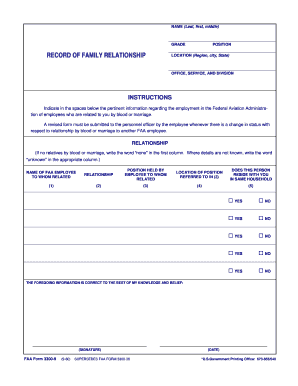
RELATIONSHIP If no relatives by blood or marriage write the word none in the first column. Where details are not known write the word unknown in the appropriate column. NAME OF FAA EMPLOYEE TO WHOM RELATED POSITION HELD BY EMPLOYEE TO WHOM RELATED LOCATION OF POSITION REFERRED TO IN 3 DOES THIS PERSON RESIDE WITH YOU IN SAME HOUSEHOLD YES NO THE FOREGOING INFORMATION IS CORRECT TO THE BEST OF MY KNOWLEDGE AND BELIEF SIGNATURE FAA Form 3300-9 9-80 SUPERSEDES FAA FORM 3300-36 DATE U.S.Government Printing Office 673-855/540. NAME Last first middle GRADE RECORD OF FAMILY RELATIONSHIP POSITION LOCATION Region city State OFFICE SERVICE AND DIVISION INSTRUCTIONS Indicate in the spaces below the pertinent information regarding the employment in the Federal Aviation Administration of employees who are related to you by blood or marriage. A revised form must be submitted to the personnel officer by the employee whenever there is a change in status with respect to relationship by blood or marriag....

How it works

  1. Open form

    Open form follow the instructions

  2. Easily sign form

    Easily sign the form with your finger

  3. Share form

    Send filled & signed form or save

How to fill out the FAA 3300-9 online

The FAA 3300-9 form is essential for documenting family relationships among employees of the Federal Aviation Administration. This guide will provide clear and detailed instructions on how to accurately complete this form online.

Follow the steps to successfully complete the FAA 3300-9 form.

  1. Click ‘Get Form’ button to obtain the form and open it in the editor.
  2. Begin by entering your name in the format of last name, first name, and middle initial in the designated section.
  3. Next, indicate your grade as required. This information usually pertains to your current position within the organization.
  4. In the 'Record of Family Relationship' section, carefully list the names of FAA employees who are related to you by blood or marriage in the appropriate fields. If you do not have any relatives, simply write 'none' in the first column.
  5. For each person listed, provide details regarding your relationship, the position they hold at the FAA, and their job location. This should include the region, city, and state.
  6. Indicate whether each relative resides with you in the same household by selecting 'yes' or 'no' for each person listed.
  7. Ensure that you review all entered information for accuracy and completeness.
  8. Finally, sign the form to confirm that the information provided is correct to the best of your knowledge and belief. Include the date of signing.
  9. Once you have completed filling out the form, you can save changes, download, print, or share the form as needed.

Complete your FAA 3300-9 form online today to maintain accurate records of your employment relationships.

Get form

Experience a faster way to fill out and sign forms on the web. Access the most extensive library of templates available.
Get form

Related content

Form FAA 3300-9 - Record of Family Relationship
Document Information ; Number: FAA 3300-9 ; Title: Record of Family Relationship ; Status:...
Learn more
2/13/76 PT P 3300.7 CHG 14
Feb 13, 1976 — FAA Form 3300-9 by their employee(s) whenever they become aware of a...
Learn more

Related links form

Boxall Profile 2020 Cricket Registration Form 2020 Staff Declaration Form 2020 Dost Scholarship Form Pdf 2020

Questions & Answers

Get answers to your most pressing questions about US Legal Forms API.

Contact support

The FAA has specific medical standards that can disqualify a pilot based on various health conditions, including but not limited to severe cardiac issues, neurological disorders, and substance abuse problems. It's crucial to understand these disqualifications before pursuing a pilot’s license. For more detailed information about FAA regulations and medical evaluations, consider checking resources available at US Legal Forms, which can assist you in navigating these requirements.

To notify the FAA of a drone flight, you typically need to register your drone and adhere to regulations about flying in controlled airspace. Notifications may vary based on the type of flight you are conducting, so it is essential to stay informed. Using tools available on US Legal Forms can streamline your compliance process, ensuring you meet FAA requirements.

Reporting a drone violation to the FAA involves using their online portal to submit your report. Include necessary details such as the time of the event and any evidence you might have. Providing comprehensive information will enable the FAA to investigate the situation efficiently. For guidance on the reporting procedure, check out helpful resources on US Legal Forms.

To report drone violations to the FAA, you need to submit a detailed incident report. This should include information such as the location, date, and nature of the violation. Remember, clear information helps the FAA take appropriate action. For a straightforward process, US Legal Forms offers templates that can assist you in preparing your report effectively.

Yes, the FAA allows individuals to file complaints anonymously. This ensures that you can express concerns about aviation safety or regulations without fear of repercussions. However, providing your contact information can facilitate faster resolution and follow-up. If you want to learn more about the complaint process, consider exploring resources at US Legal Forms for clear instructions.

The FAA form 8130-9 is a crucial document in aviation, primarily used for the approval of aircraft and parts for safety. It serves as an authorization for manufacturers and repair stations to certify that their products meet regulatory standards. You can find it particularly useful if you need to ensure compliance with federal aviation requirements. For detailed guidance on the FAA form 8130-9, platforms like US Legal Forms can provide useful resources.

Yes, FAA Form 337 can be completed electronically. You can fill out the form using PDF software, making it easier to input information accurately. Once completed, you can submit it either electronically through the FAA's system or print it for mailing. For convenience and to access helpful resources, uslegalforms is an excellent platform to assist you in this process.

Submitting FAA Form 337 electronically can be done through the FAA's official online submission system. You'll need to create an account and follow the prompts to upload your completed form. It's essential to ensure your document is filled out correctly to avoid delays. For more efficient navigation of this process, consider using uslegalforms for guidance and templates.

After completing maintenance and returning an aircraft to service, you must submit FAA Form 337 within 48 hours. This timeline is crucial to ensure that all modifications are officially documented and registered with the FAA. Delaying this submission can lead to compliance issues or complications during inspections. Utilizing platforms like uslegalforms can help you stay organized and meet these deadlines.

Filing an FAA report involves gathering necessary information related to the report type, such as FAA Form 337 for repairs or alterations. You can download the form from the FAA's website, fill it out accurately, and then submit it to the appropriate FAA office. It's essential to keep a copy for your records as well. For streamlined access and guidance on filing, consider using uslegalforms to ensure correct submission.

Get This Form Now!

Use professional pre-built templates to fill in and sign documents online faster. Get access to thousands of forms.
Get form
If you believe that this page should be taken down, please follow our DMCA take down processhere.
Get FAA 3300-9
Get form
  • Adoption
  • Bankruptcy
  • Contractors
  • Divorce
  • Home Sales
  • Employment
  • Identity Theft
  • Incorporation
  • Landlord Tenant
  • Living Trust
  • Name Change
  • Personal Planning
  • Small Business
  • Wills & Estates
  • Packages A-Z
  • Affidavits
  • Bankruptcy
  • Bill of Sale
  • Corporate - LLC
  • Divorce
  • Employment
  • Identity Theft
  • Internet Technology
  • Landlord Tenant
  • Living Wills
  • Name Change
  • Power of Attorney
  • Real Estate
  • Small Estates
  • Wills
  • All Forms
  • Forms A-Z
  • Form Library
  • Legal Hub
  • About Us
  • Help Portal
  • Legal Resources
  • Blog
  • Affiliates
  • Contact Us
  • Delete My Account
  • Site Map
  • Industries
  • Forms in Spanish
  • Localized Forms
  • State-specific Forms
  • Forms Kit
  • Real Estate Handbook
  • All Guides
  • Notarize
  • Incorporation services
  • For Consumers
  • For Small Business
  • For Attorneys
  • USLegal
  • FormsPass
  • pdfFiller
  • signNow
  • altaFlow
  • DocHub
  • Instapage
Form Packages
  • Adoption
  • Bankruptcy
  • Contractors
  • Divorce
  • Home Sales
  • Employment
  • Identity Theft
  • Incorporation
  • Landlord Tenant
  • Living Trust
  • Name Change
  • Personal Planning
  • Small Business
  • Wills & Estates
  • Packages A-Z
Form Categories
  • Affidavits
  • Bankruptcy
  • Bill of Sale
  • Corporate - LLC
  • Divorce
  • Employment
  • Identity Theft
  • Internet Technology
  • Landlord Tenant
  • Living Wills
  • Name Change
  • Power of Attorney
  • Real Estate
  • Small Estates
  • Wills
  • All Forms
  • Forms A-Z
  • Form Library
Customer Service
  • Legal Hub
  • About Us
  • Help Portal
  • Legal Resources
  • Blog
  • Affiliates
  • Contact Us
  • Delete My Account
  • Site Map
  • Industries
  • Forms in Spanish
  • Localized Forms
  • State-specific Forms
  • Forms Kit
Legal Guides
  • Real Estate Handbook
  • All Guides
Prepared for you
  • Notarize
  • Incorporation services
Our Customers
  • For Consumers
  • For Small Business
  • For Attorneys
Our Sites
  • USLegal
  • FormsPass
  • pdfFiller
  • signNow
  • altaFlow
  • DocHub
  • Instapage
Social Media
Call us now toll free:
+1 833 426 79 33
As seen in:
© Copyright 1999-2026 airSlate Legal Forms, Inc. 3720 Flowood Dr, Flowood, Mississippi 39232
  • Your Privacy Choices
  • Terms of Service
  • Privacy Notice
  • Content Takedown Policy
  • Bug Bounty Program