Loading
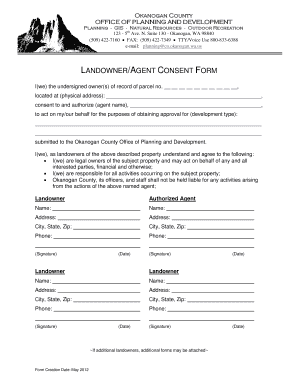
Get Landowner/agent Consent Form - Okanogan County - Okanogancounty
How it works
-

Open form follow the instructions
-

Easily sign the form with your finger
-

Send filled & signed form or save
How to fill out the LANDOWNER/AGENT CONSENT FORM - Okanogan County online
The LANDOWNER/AGENT CONSENT FORM is a crucial document for property owners in Okanogan County who wish to authorize an agent for development approvals. This guide provides step-by-step instructions on how to complete the form efficiently and accurately online.
Follow the steps to fill out the LANDOWNER/AGENT CONSENT FORM online.
- Press the ‘Get Form’ button to access the LANDOWNER/AGENT CONSENT FORM and open it in your preferred online editor.
- In the first section, fill in the parcel number corresponding to your property. This number can typically be found on previous property documents or local tax bills.
- Next, provide the physical address of the property you are authorizing the agent to act upon. Ensure this is accurate to prevent any confusion.
- In the designated space for the agent's name, write the full name of the person or organization you are authorizing to act on your behalf.
- Indicate the type of development for which you are granting consent by briefly describing the project in the provided fields.
- Confirm that you, as the landowner, understand and agree to the responsibilities detailed in the form, particularly regarding liability and ownership.
- Enter your name, address, city, state, zip code, and phone number in the landowner section, ensuring all information is accurate.
- Sign and date the form in the spaces provided to validate your consent. If there are multiple landowners, ensure each signs in their respective area.
- If there are additional landowners, complete a separate consent form for each, as needed.
- Finally, review the completed document for accuracy, then save changes, download, print, or share the form as necessary.
Complete your LANDOWNER/AGENT CONSENT FORM online today to ensure a smooth process.