Loading
Get Mv 673
How it works
-

Open form follow the instructions
-

Easily sign the form with your finger
-

Send filled & signed form or save
How to fill out the Mv 673 online
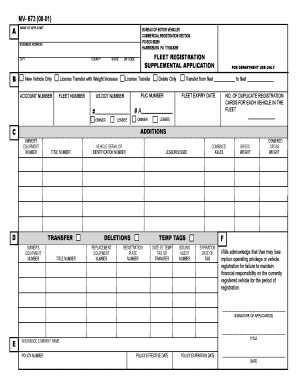
The Mv 673 form is an essential document for vehicle registration and fleet management. This guide will provide clear instructions on how to complete the form online, ensuring a smooth process for all users.
Follow the steps to fill out the Mv 673 form accurately.
- Click the ‘Get Form’ button to obtain the Mv 673 form and open it in the designated editor.
- Begin by filling in the name of the applicant in the appropriate field. Ensure that all names are spelled correctly to avoid any registration issues.
- Enter your business address, including the city, county, state, and zip code. This information is crucial for identification and contact purposes.
- Indicate whether this application is for a new vehicle only, a license transfer with weight increase, or a standard license transfer by checking the appropriate box.
- Include your account number, fleet number, and any applicable PUC or US DOT numbers. These identifiers are necessary for your registration process.
- Specify whether the registrant is the owner or lessee by checking the relevant box, along with appropriate information for fleet transfer if applicable.
- Complete sections regarding equipment numbers, title numbers, and vehicle serial or identification numbers. Ensure accuracy to prevent delays in processing.
- For additions or deletions, fill in the relevant fields. This ensures that your fleet information is current and accurate.
- Complete the sections for combined axles, gross weight, and expiration date of the tags. This information is critical for compliance with state regulations.
- Review the acknowledgment statement regarding financial responsibility. Ensure you understand the implications of failing to maintain insurance coverage.
- Sign and date the application where indicated. Be sure to include your title and insurance company name along with the policy details.
- Once you have completed the form, you can save changes, download, print, or share the form as needed.
Complete your Mv 673 form online today for efficient vehicle registration processing.
Get form
Experience a faster way to fill out and sign forms on the web. Access the most extensive library of templates available.
Pennsylvania residents have the option of renewing their vehicle registration for two years instead of one year for most vehicle types. When first registering a car or truck in Pennsylvania, drivers can elect either the one-year or two-year renewal option.
Get This Form Now!
Use professional pre-built templates to fill in and sign documents online faster. Get access to thousands of forms.