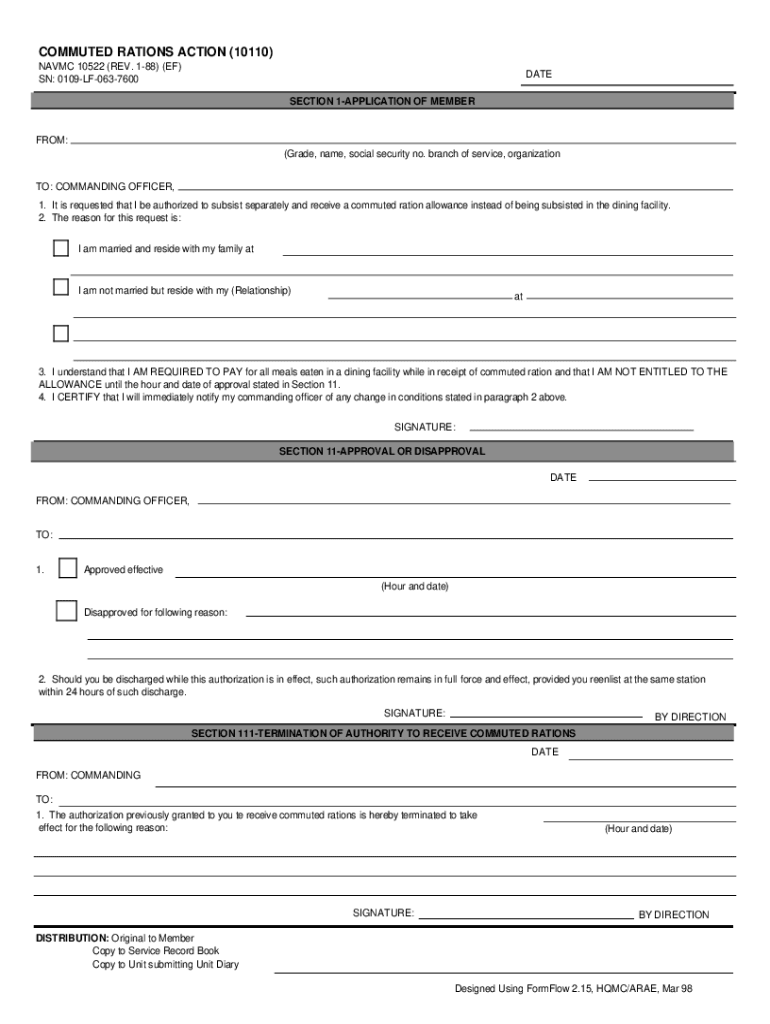
U.S. DOD Form dod-navmc-10522 COMMUTED RATIONS ACTION 10110 NAVMC 10522 REV. 1-88 EF SN 0109-LF-063-7600 DATE SECTION 1-APPLICATION OF MEMBER FROM Grade name social security no. branch of service organization TO COMMANDING OFFICER 1. It is requested that I be authorized to subsist separately and receive a commuted ration allowance instead of being subsisted in the dining facility. 2. The reason for this request is I am married and reside with my family at I am not married but reside with my Relationship at 3. I understand that I AM REQUIRED TO PAY for all meals eaten in a dining facility while in receipt of commuted ration and that I AM NOT ENTITLED TO THE ALLOWANCE until the hour and date of approval stated in Section 11. 4. I CERTIFY that I will immediately notify my commanding officer of any change in conditions stated in paragraph 2 above. SIGNATURE SECTION 11-APPROVAL OR DISAPPROVAL FROM COMMANDING OFFICER TO Approved effective Hour and date Disapproved for following reason 2. Sho....
Loading

Open form follow the instructions

Easily sign the form with your finger

Send filled & signed form or save
How to fill out the NAVMC 10522 online
The NAVMC 10522 form is essential for individuals requesting authorization to subsist separately and receive a commuted ration allowance. This guide provides clear, step-by-step instructions on how to complete this form online, ensuring a smooth and efficient submission process.
Follow the steps to fill out the NAVMC 10522 form online:
- Click the ‘Get Form’ button to access the document and open it in your preferred editor.
- In Section 1, fill in your details: include your grade, name, social security number, branch of service, and organization.
- Indicate whom you reside with by checking the appropriate box: if married, specify your family’s location; if unmarried, provide the relationship and location of the person you reside with.
- Acknowledge your understanding of the payment requirement by indicating that you will pay for all meals consumed in a dining facility while receiving the commuted ration.
- Certify your commitment to notify your commanding officer of any changes in your relationship status as indicated in the previous section.
- Sign and date the form at the appropriate place to authenticate your application.
- In Section 11, if your request is approved or disapproved, the commanding officer will provide their signature and the effective date of the action.
- In Section 111, if the authorization is terminated, the reasons for termination must be recorded along with the commanding officer's signature and effective date.
- Once the form is completed, be sure to save your changes, download, print, or share the document as needed.
Complete your NAVMC 10522 form online today for a seamless submission process.
Experience a faster way to fill out and sign forms on the web. Access the most extensive library of templates available.
Related content
This course contains 3 study units. Each study unit begins with a general objective which...
NAVMC 10522, Commuted Rations Action Form: File in command's correspondence files. q. Any...
Get answers to your most pressing questions about US Legal Forms API.
How to put in leave in the navy?
To request leave in the Navy, begin by determining the nature of your leave and the desired dates. Complete the leave request using the proper forms, including NAVMC 10522, and submit it to your chain of command for approval. Following these steps ensures a structured approach and increases the likelihood of a timely response.
Where is leave on NSIPs?
Leave information on NSIPs can typically be found under the personnel or leave request sections. Make sure to navigate through the interface to locate your leave status and any additional details. Regularly checking NSIPs ensures you remain informed and prepared for your leave periods.
How to fill out APO form?
Completing an APO form involves several important steps. You should provide accurate address details and relevant information about your package. For assistance, consider checking platforms like US Legal Forms, which offer helpful templates and resources to make the process more straightforward.
How to fill out leave form Navy?
To fill out a Navy leave form, begin by gathering all your personal and duty information. Be sure to indicate the type of leave you are requesting and the dates you plan to be away. Using forms like NAVMC 10522 can guide you through the specifics and ensure that all necessary information is included for a smooth approval process.
How to fill out navcompt form 3065?
Filling out NAVCOMPT Form 3065 requires clear attention to detail. Start by entering your personal information and purpose of leave; ensure accuracy, as mistakes can delay processing. Utilizing resources such as the US Legal Forms platform can simplify the process and provide templates to help you complete the form effectively.
How does leave work in the navy?
In the Navy, leave refers to the authorized absence from duty for various personal reasons. Service members earn leave based on their time served, and they can use forms like NAVMC 10522 to submit their leave requests. When following the proper procedures, sailors can effectively manage their time off, ensuring they comply with Navy regulations while enjoying personal moments.
How to file VA Form 21 4138?
Filing VA Form 21 4138 is straightforward. You need to gather required information and fill out the form accurately to provide necessary statements for your claim. Using platforms like USLegalForms can help you streamline your filing process, making it easier to stay organized and submit forms related to NAVMC 10522 efficiently.
Do you get more BAS with dependents?
Yes, having dependents can impact the amount of BAS you receive. Generally, service members with dependents receive a higher rate of BAS compared to those without. This distinction acknowledges the increased financial responsibilities of supporting additional family members, as documented in the NAVMC 10522.
Is subsistence allowance the same as BAS?
Yes, the subsistence allowance generally refers to BAS. Specifically defined in documents like the NAVMC 10522, BAS serves as compensation for food expenses. This understanding helps service members recognize their entitlements and plan their budgets accordingly.
Is BAS the same as ComRats?
No, BAS is not the same as ComRats. While BAS is a daily allowance aimed at covering food costs, ComRats is designated for particular circumstances where service members lack access to dining facilities. Understanding these distinctions is crucial for managing your finances effectively, especially when referencing forms like NAVMC 10522.
Use professional pre-built templates to fill in and sign documents online faster. Get access to thousands of forms.
If you believe that this page should be taken down, please follow our DMCA take down process here.