Loading
Get A433 Form
How it works
-

Open form follow the instructions
-

Easily sign the form with your finger
-

Send filled & signed form or save
How to fill out the A433 Form online
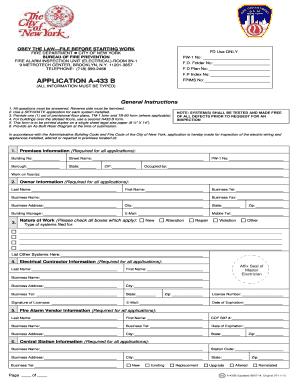
The A433 Form is a crucial document required by the Fire Department of New York for inspection of electrical wiring and appliances. This guide will walk you through the process of filling out the A433 Form online, ensuring you meet all requirements with ease.
Follow the steps to complete the A433 Form online.
- Click ‘Get Form’ button to obtain the form and open it in the editor.
- Begin by entering the premises information. Fill in the building number, street name, borough, state, and ZIP code. Also, indicate the occupancy and work being conducted on specific floors.
- Next, provide the owner information. Input the last name, first name, business telephone number, business name, business fax, business address, city, state, building manager's name, email address, and mobile telephone number.
- In this section, check all applicable boxes to indicate the nature of work being performed: new, alteration, repair, violation, or other. Additionally, specify the type of systems being filed for and list any other systems as necessary.
- Complete the electrical contractor information by entering the last name, first name, business name, business address, city, business telephone number, state, email address, ZIP code, license number, and expiration date. Affix the seal of the master electrician here.
- Provide fire alarm vendor information, including the last name, first name, COF S97 number, business name, business telephone number, expiration date, business address, city, state, and ZIP code.
- Fill out the central station information by entering the business name, address, telephone number, city, state, and ZIP code.
- Indicate the number of proposed devices across all floors in the sections provided, including initiating, supervisory, control signals, fire and control panels, and communication devices.
- Finally, review all entries for accuracy. Save your changes, and then download, print, or share the completed form as needed.
Complete your A433 Form online now to ensure timely processing.
Alternatively, you can pay these fees online at nyc.gov/citypay by clicking the "Pay Inspection Fee" button. To speak with someone at the FDNY's accounting unit, reach out to 718-999-2905 or 718-999-0618.