Loading
Get Molina Walmart Gift Card
How it works
-

Open form follow the instructions
-

Easily sign the form with your finger
-

Send filled & signed form or save
How to fill out the Molina Walmart Gift Card online
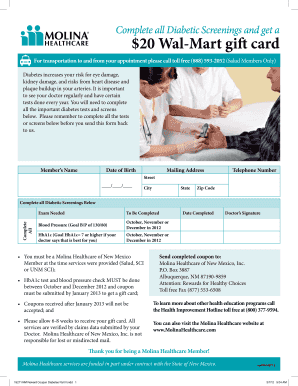
This guide provides a clear and detailed walkthrough on how to fill out the Molina Walmart Gift Card form online, ensuring that users receive their gift card after completing essential diabetic screenings. By following these instructions, you can easily navigate through the form's components and submit it correctly.
Follow the steps to successfully complete the Molina Walmart Gift Card online form.
- Click ‘Get Form’ button to obtain the form and open it in the editor.
- Enter the member’s name in the designated field. This should be the full name of the individual receiving the gift card.
- Provide the date of birth in the required format, ensuring accuracy to match the records.
- Fill in the complete mailing address, including street, city, state, and zip code. Ensure that all components are correct for proper delivery.
- Input the telephone number in the specified section, including the area code.
- In the 'Complete All' section, mark off the exams that have been completed, specifically the blood pressure and HbA1c tests, as well as the date completed.
- Obtain the doctor’s signature in the designated area to confirm that the tests have been completed.
- Once all fields are filled out accurately, review the form for any errors before finalizing the submission.
- Send the completed coupon to the specified address, ensuring it is mailed before the deadline for the gift card submission.
- Please allow 6-8 weeks for the gift card to be processed and delivered.
Complete your Molina Walmart Gift Card form online today to ensure you receive your rewards!
Click Apply Gift CardYou can use up to five gift cards on one order, or combine a gift card payment with your credit/debit card or in-store cash payment.