Loading
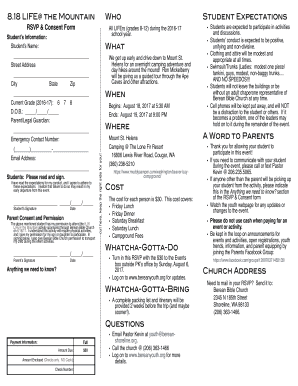
Get 8.18 Life @ The Mountain Rsvp & Consent Form 2017-2026
How it works
-

Open form follow the instructions
-

Easily sign the form with your finger
-

Send filled & signed form or save
How to fill out the 8.18 Life @ The Mountain RSVP & Consent Form online
Completing the 8.18 Life @ The Mountain RSVP & Consent Form online is an important step to ensure participation in this exciting event. This guide provides clear, step-by-step instructions to help users navigate the form effortlessly.
Follow the steps to successfully fill out the RSVP & Consent Form.
- Click ‘Get Form’ button to retrieve the RSVP & Consent Form and open it for editing.
- Begin by entering the student’s information in the designated fields. This includes the student’s name, street address, city, state, zip code, current grade, and date of birth.
- Provide the parent or legal guardian’s information by filling in their name and emergency contact number. Make sure to also include an email address for communication purposes.
- Students must read the expectations for conduct. After reading, they should sign and date the form to indicate their agreement to adhere to these expectations.
- Next, the parent or legal guardian must give consent for the student to attend the event. They will need to fill in their signature and the date to authorize participation.
- If there are any specific needs or additional information required, use the 'Anything we need to know?' section to provide details.
- Fill out the payment information, including the full amount due and the amount enclosed, specifying the check number. Only checks are accepted for payment.
- Once all sections are completed, review the form to ensure accuracy. After confirming all information is correct, save your changes. You can then download, print, or share the completed form as needed.
Complete the 8.18 Life @ The Mountain RSVP & Consent Form online today to secure your spot at this exciting event!