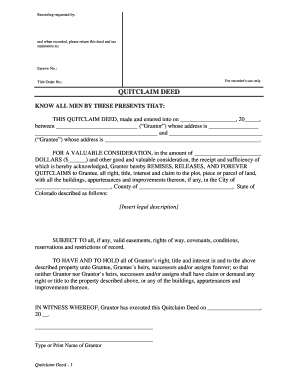
Get Co Quitclaim Deed
How it works
-

Open form follow the instructions
-

Easily sign the form with your finger
-

Send filled & signed form or save
How to fill out the CO Quitclaim Deed online
This guide provides a clear and supportive approach to completing the Colorado Quitclaim Deed online. Whether you are familiar with legal documentation or a beginner, you will find step-by-step instructions tailored to help you navigate the form effectively.
Follow the steps to complete the CO Quitclaim Deed.
- Click the ‘Get Form’ button to access the CO Quitclaim Deed and open it in your editor.
- Fill in the date of the deed at the top of the form. This should reflect the current date when you are completing the document.
- Enter the name of the Grantor (the person transferring the property) and their address in the specified fields.
- Next, write the name of the Grantee (the person receiving the property) along with their address in the designated section.
- Indicate the amount of consideration involved in the transfer. This is typically the sale price or value of the property in dollars.
- Provide a legal description of the property being transferred. This description must be accurate and should match the records.
- Specify any easements or restrictions that may affect the property. This should be noted in the appropriate section of the deed.
- Complete the acknowledgment section. This must include the date and the names of the individuals involved in the transaction along with their signatures.
- If a notary public is present, they will fill in their details and seal the document. Make sure all required information is provided to ensure proper notarization.
- After reviewing all fields for accuracy, you can save changes, download, print, or share the completed deed as needed.
Complete your CO Quitclaim Deed online today and ensure a smooth property transfer.
To properly fill out a CO Quitclaim Deed, start by clearly identifying the grantor and grantee, followed by a detailed description of the property being transferred. Make sure to include the date of transfer and any necessary notary information for validity. Double-check all details for accuracy, as mistakes can lead to complications down the line. Platforms like US Legal Forms offer comprehensive resources to help you ensure every step is executed correctly.