Loading
Get Ca Bcia 8016fp 2021-2026
How it works
-

Open form follow the instructions
-

Easily sign the form with your finger
-

Send filled & signed form or save
How to use or fill out the CA BCIA 8016FP online
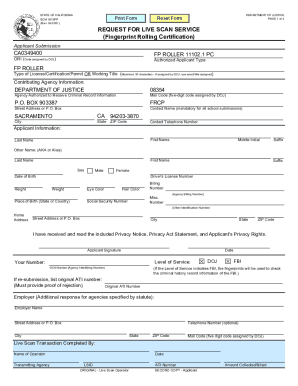
The CA BCIA 8016FP is a crucial form used for requesting live scan services, specifically for fingerprint rolling certification in California. This guide will provide clear, step-by-step instructions to assist users in completing this form online with confidence.
Follow the steps to fill out the CA BCIA 8016FP online effectively.
- Press the ‘Get Form’ button to access the CA BCIA 8016FP and load it into your online editor.
- In the ‘Authorized Applicant Type’ section, select the appropriate type that corresponds with your application. Make sure to choose ‘FP ROLLER’ only if it is relevant to your submission.
- Fill in the ‘Type of License/Certification/Permit or Working Title’ field with exact titles that may have been assigned by the DOJ, ensuring not to exceed 30 characters.
- Provide the contributing agency information, which includes the name, mail code, street address, city, state, and ZIP code of the Department of Justice.
- Input the ‘Contact Name’ for all school submissions, if applicable, along with the ‘Contact Telephone Number’.
- Complete the ‘Applicant Information’ section by entering your first name, last name, middle initial, suffix, other names (if any), sex, date of birth, driver's license number, height, weight, place of birth, eye color, and hair color.
- Fill in your social security number and any other identification numbers you may have.
- Provide your home address, including the street address, city, state, and ZIP code.
- Acknowledge that you have received and read the included privacy notice by signing in the ‘Applicant Signature’ field and entering the date.
- Indicate the level of service by selecting the correct options (DOJ, FBI) according to your application requirements.
- If applicable, include your original ATI number and employer information if you are submitting for an agency.
- After filling in all required fields, review all entries for accuracy, and finalize your submission by saving changes, then downloading, printing, or sharing the filled form as necessary.
Complete your CA BCIA 8016FP online today to ensure a smooth application process!