Loading
Get Electronic Staff Summary Sheet
How it works
-

Open form follow the instructions
-

Easily sign the form with your finger
-

Send filled & signed form or save
How to fill out the Electronic Staff Summary Sheet online
The Electronic Staff Summary Sheet is a vital document used for summarizing important staff actions and obtaining necessary approvals. This guide provides clear and detailed instructions to help users efficiently fill out the form online, ensuring all necessary components are addressed.
Follow the steps to successfully complete your Electronic Staff Summary Sheet.
- Click ‘Get Form’ button to obtain the Electronic Staff Summary Sheet and open it in your preferred editor.
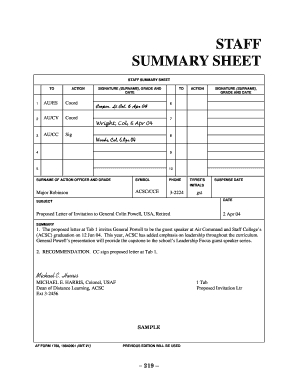
- Begin by filling in the 'To' section, specifying the individuals or offices the document is directed to. Use complete titles and make sure to list them in the correct order of action required.
- In the 'Action' section, clearly state what is needed from the recipients—whether it is coordination, approval, or a signature—using the appropriate abbreviations (e.g., Coord, Appr, Sig).
- Next, fill in the 'Surname of Action Officer and Grade' section. Include the full name and rank of the person responsible for initiating the document.
- In the 'Subject' field, describe the topic of your summary in a concise manner, providing context for the recipients.
- Provide a detailed 'Summary' section where you outline the purpose of the document, relevant background information, and any necessary discussions that justify the desired action.
- List any attachments using the 'Tabs' format. Indicate what documents are included with the submission and label them appropriately, e.g., 'Tab 1: Proposed Letter of Invitation.'
- Finally, ensure to include relevant dates and contact information for the staff involved, including any suspense dates for responses.
- Before submitting, review all the information for accuracy. Save your changes, and download or print the completed form if needed.
Complete your Electronic Staff Summary Sheet online today for efficient processing.
The AF Form 55 is available on the United States Air Force documentation website or can be supplied through the chain of command. The first section of the AF Form 55 is to be filled out by the workplace supervising authority.