Loading
Get Step 4: Hotline Complaint Form - Headquarters Marine Corps
How it works
-

Open form follow the instructions
-

Easily sign the form with your finger
-

Send filled & signed form or save
How to fill out the Step 4: Hotline Complaint Form - Headquarters Marine Corps online
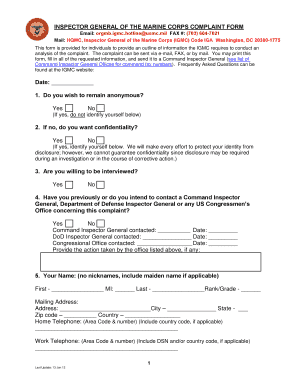
The Step 4: Hotline Complaint Form is a crucial document for individuals wishing to report concerns to the Inspector General of the Marine Corps. This guide will assist you in completing the form online effectively, ensuring your complaint is submitted systematically and comprehensively.
Follow the steps to complete the form accurately and submit your complaint.
- Use the ‘Get Form’ button to access the Hotline Complaint Form online. This will allow you to download or open the form in the appropriate editor.
- Begin by entering the date of the complaint in the designated field at the top of the form.
- Indicate whether you wish to remain anonymous by selecting Yes or No. If you choose Yes, do not fill out your personal information in the subsequent sections.
- If you answered No to the previous question, specify if you desire confidentiality by selecting Yes or No. If Yes, provide your details in the next sections but be aware that absolute confidentiality cannot be guaranteed.
- Indicate if you are willing to be interviewed regarding your complaint by choosing Yes or No.
- Answer whether you have previously contacted a Command Inspector General, Department of Defense Inspector General, or any Congressional Office about this matter, and provide any necessary details such as names and dates.
- In the field labeled ‘Your Name’, fill in your first name, middle initial, last name, and rank/grade. Avoid using nicknames.
- Complete your mailing address, ensuring you include city, state, zip code, and country.
- Fill in your home and work telephone numbers, ensuring you include area codes and country codes where applicable.
- Provide your email address for further correspondence.
- In the section labeled ‘Who is involved?’, list the names, ranks, and duty stations of everyone involved in the incident, including witnesses.
- Describe the actions of the subject(s) that you believe were wrong, detailing what they did or failed to do.
- State the specific rule, regulation, or law you believe was violated by the subject.
- Indicate when the incident occurred, providing specific dates or a general timeframe.
- Detail the location where the incident took place.
- Explain your perspective on why you believe the incident occurred.
- Outline any steps you have taken to resolve the problem, including any previous contact with your command chain or other offices.
- Clearly state what action you would like the Inspector General to take in response to your complaint.
- Finally, read the statement regarding the accuracy of your submission, then sign and date where indicated to certify the truthfulness of the information provided.
Complete your complaint form online today to ensure your concerns are addressed promptly.
The TEXT, WEB & APP Tip Line is a partnership between NCIS and the military community AND provides service members and civilians a safe, discreet and ANONYMOUS option to report criminal and force protection threats within the USN and USMC without concerns of retaliation. Call toll free (877) 579-3648.