Loading
Get Aanvraag Tot Inschrijving Proefrittenplaat: Btw Attesten 2015-2025
How it works
-

Open form follow the instructions
-

Easily sign the form with your finger
-

Send filled & signed form or save
How to fill out the Aanvraag Tot Inschrijving Proefrittenplaat: Btw Attesten online
This guide provides a clear and detailed overview of how to accurately complete the Aanvraag Tot Inschrijving Proefrittenplaat: Btw Attesten form online. By following these instructions, users can ensure that their applications are submitted correctly and efficiently.
Follow the steps to successfully complete the Aanvraag Tot Inschrijving Proefrittenplaat: Btw Attesten form.
- Click the ‘Get Form’ button to access the Aanvraag Tot Inschrijving Proefrittenplaat: Btw Attesten form and open it for editing.
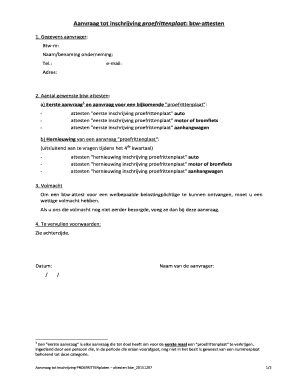
- Enter your personal information in the 'Gegevens aanvrager' section. Provide your VAT number, name or business name, telephone number, email address, and mailing address.
- Specify the number of desired VAT certificates in the second section. For your initial request, indicate whether you need certificates for 'first registration of plate' for a car, motorcycle or moped, or trailer.
- If renewing a plate request, indicate that the request is for renewal (to be requested only during the fourth quarter) and select from the options for automobiles, motorcycles or mopeds, or trailers.
- In the 'Volmacht' section, if you have not previously submitted a legal power of attorney, include it with this application to receive a VAT certificate for a specific taxpayer.
- Review and meet the conditions outlined in the form, including professional qualifications and adherence to regulations mentioned on the back of the form.
- Enter the date of submission and print the name of the applicant at the bottom of the form.
- After completing the form, verify all information, then save your changes, download a copy, print, or prepare to share the completed form as necessary.
Complete your application online to ensure a smooth submission process.
Hoe de aanvraag invullen? Vul het aanvraagformulier tot inschrijving in. Vraag uw verzekeraar een verzekeringsvignet te kleven op het aanvraagformulier. Stuur het aanvraagformulier en het verzekeringsvignet op naar: DIV. City Atrium. Vooruitgangstraat 56. 1210 Brussel.
Industry-leading security and compliance
US Legal Forms protects your data by complying with industry-specific security standards.
-
In businnes since 199725+ years providing professional legal documents.
-
Accredited businessGuarantees that a business meets BBB accreditation standards in the US and Canada.
-
Secured by BraintreeValidated Level 1 PCI DSS compliant payment gateway that accepts most major credit and debit card brands from across the globe.