Loading
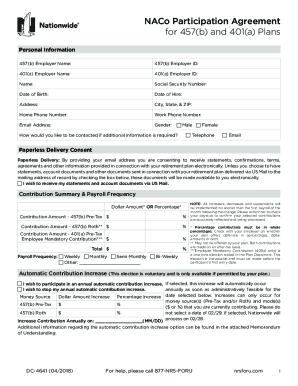
Get Naco Participation Agreement - Nrsforu
How it works
-

Open form follow the instructions
-

Easily sign the form with your finger
-

Send filled & signed form or save
How to fill out the NACo Participation Agreement - NRSforU online
The NACo Participation Agreement - NRSforU is an essential form for participating in the retirement plans and ensuring proper contributions and beneficiary designations. This guide provides clear, step-by-step instructions to help you navigate the form online with ease.
Follow the steps to successfully complete the NACo Participation Agreement - NRSforU online.
- Select the ‘Get Form’ button to access and open the NACo Participation Agreement - NRSforU in your preferred editing tool.
- Begin by completing the Personal Information section. Fill in your 457(b) employer name and ID, 401(a) employer name and ID, your name, Social Security number, date of birth, date of hire, address, city, state, ZIP, home phone number, work phone number, email address, and gender.
- In the Paperless Delivery Consent section, indicate your preference for receiving documents electronically by providing your email address. You may choose to opt-in for paper statements by checking the appropriate box.
- Proceed to the Contribution Summary & Payroll Frequency section where you will need to specify your contribution amounts for the 457(b) pre-tax, 457(b) Roth, and 401(a) plans, either in dollar amounts or percentages. Ensure your contributions are in whole percentages.
- If applicable, select your preference for the Automatic Contribution Increase option. Indicate whether you would like to participate and specify the increase dollar or percentage amounts and the date selected for the increase.
- Complete the Beneficiary Designation section by providing information for your primary and contingent beneficiaries. Ensure that the percentage split for all beneficiaries totals 100%.
- In the Funding Options section, allocate your contributions among designated investment options. Ensure that the total of both columns equals 100%.
- Sign and date the authorization section to confirm your chosen contributions and beneficiary designations.
- After completing the form, review all sections for accuracy, save your changes, and download or print the NACo Participation Agreement - NRSforU.
- Finally, follow the instructions for returning the completed form, either by mailing it or faxing it to the appropriate contact, ensuring it reaches the necessary destination.
Begin filling out the NACo Participation Agreement - NRSforU online today to secure your retirement plan and ensure your contributions are properly managed.
You can take up to $10,000 out of your IRA penalty-free for a first-time home purchase. If you are married, your spouse can do the same. Also, first-time home is defined loosely. For the purposes of the IRS, it is your first-time home if you have not had ownership interest in a home for the past two years.