Loading
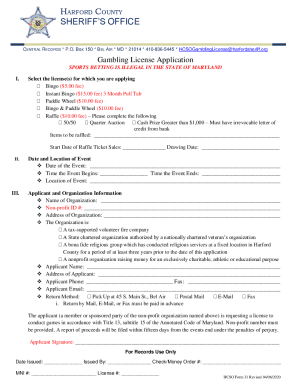
Get Md Hcso Form 31 - Harford County 2020-2026
How it works
-

Open form follow the instructions
-

Easily sign the form with your finger
-

Send filled & signed form or save
How to fill out the MD HCSO Form 31 - Harford County online
Filling out the MD HCSO Form 31 - Harford County online can be a straightforward process when you follow the appropriate steps. This guide provides clear and detailed instructions to help you complete the gambling license application with confidence.
Follow the steps to complete your application online.
- Press the ‘Get Form’ button to access the form and open it in your chosen editing tool.
- Select the type of license you are applying for by checking the relevant box. Options include Bingo, Instant Bingo, Paddle Wheel, and Raffle, among others.
- Provide the details related to the raffle if applicable. Specify if it is a 50/50, Quarter Auction, or has a cash prize greater than $1,000, and include an irrevocable letter of credit from your bank if necessary.
- Fill in the date and location details of the event. Indicate the event date, start time, end time, and location.
- Enter your organization's name and non-profit ID number. Include the organization’s address and identify the type of organization from the provided options.
- Complete the applicant information, entering the applicant's name, address, phone number, fax number, and email address.
- Choose your preferred method of receiving the license by selecting an option for pick up, postal mail, email, or fax. Remember that mailing options require payment in advance.
- Sign the application to confirm that you are a member or sponsored party of the non-profit organization and that you are in compliance with all required regulations.
- Review all entered information for accuracy. Once everything is confirmed, you can save your changes, download, print, or share the completed form as needed.
Complete your MD HCSO Form 31 online today for a smooth application process.